
HP Stream 8 Speakers Replacement

Nick Miller and
Last updated on Jan 15, 2026
Views: 897
View statistics:
- Past 24 Hours:
- 4
- Past 7 Days:
- 26
- Past 30 Days:
- 86
- All Time:
- 897
Comments: 1
1 comment on steps.
Completed: 1 2
1 person has marked this guide "completed." Will you be next?
2 people have marked this guide "completed." Including you — great job!
Favorites: 0 1
No one has favorited (and subscribed to) this guide. Will you be the first?
1 person has favorited (and subscribed to) this guide — and that's you!
Better Introduction
Improve this guide by completing or revising its introduction.
Introduction
Go to step 1 ↓This guide will provide a step-by-step walk through on replacing the speakers in a HP Stream 8.
What you need
Tools


-
-
-
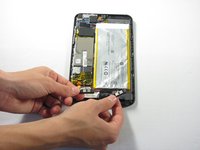
Slide your finger around the rest of the back cover, lifting it completely off of the device.
-
-
-
-
Tool used on this step:Tweezers$4.99
-
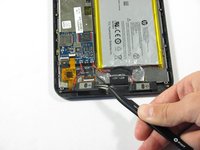
Locate the two speakers at the bottom of the device.
-
Remove the two speakers by prying them out using a pair of tweezers.
-
Detach the red and black power wiring from the device and pull the speakers entirely out of the HP Stream 8.
-
-
-
Grab the two replacement speakers and the soldering iron.
-
Locate where the red and black power wiring previously connected to the device.
-
Attach and re-solder the red and black power wiring.
-
-

 Ask FixBot



To reassemble your device, follow these instructions in reverse order.
Cancel: I did not complete this guide.
One other person completed this guide.

Team

Cal Poly, Team 34-14, Maness Spring 2016 Member of Cal Poly, Team 34-14, Maness Spring 2016
CPSU-MANESS-S16S34G14
4 Members
72 Guides authored
