Free Shipping on Domestic Orders $75+

iPhone 15 Pro Front Camera Assembly Removal

Prerequisite Only
This is a prerequisite-only guide! This guide is part of another procedure and isn’t meant to be used alone.

What you need

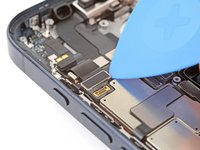
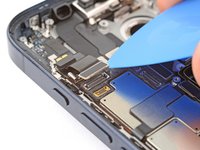
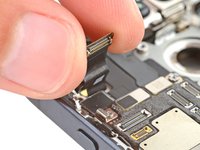
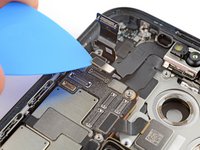
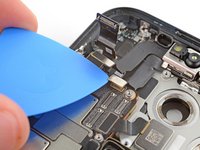
    1. iPhone 15 Pro Front Camera Assembly Removal, Move the microphone cable: step 1, image 1 of 3 iPhone 15 Pro Front Camera Assembly Removal, Move the microphone cable: step 1, image 2 of 3 iPhone 15 Pro Front Camera Assembly Removal, Move the microphone cable: step 1, image 3 of 3
      • The microphone cable covers the front sensors press connector.

      • Use the tip of an opening pick to disconnect the microphone press connector from the top left corner of the logic board.

      • Lift the cable out of the way so you can access the two press connectors on the logic board's top edge.

      Ask FixBot

      Add Comment

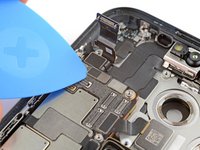
    2. iPhone 15 Pro Front Camera Assembly Removal, Disconnect the front camera assembly: step 2, image 1 of 3 iPhone 15 Pro Front Camera Assembly Removal, Disconnect the front camera assembly: step 2, image 2 of 3 iPhone 15 Pro Front Camera Assembly Removal, Disconnect the front camera assembly: step 2, image 3 of 3
      • Use the tip of an opening pick to pry up and disconnect the front sensors and front camera press connectors from the top edge of the logic board.

      Ask FixBot

      Add Comment

    3. iPhone 15 Pro Front Camera Assembly Removal, Remove the front camera assembly: step 3, image 1 of 1
      • Remove the front camera assembly.

      • Be careful not to touch or smudge the camera or sensor lenses.

      Ask FixBot

      Add Comment

Finish Line

Cancel: I did not complete this guide.

Spencer Day

Member since: 09/14/22

205,851 Reputation

1,267 Guides authored

0 Guide Comments

Add Comment

View Statistics:

Past 24 Hours: 1

Past 7 Days: 3

Past 30 Days: 9

All Time: 199