Shop the Holiday Gift Guide
Free Shipping on Domestic Orders $75+

iPhone 15 Pro Front Camera Assembly Installation

Views: 115

View statistics:

Past 24 Hours:
0
Past 7 Days:
1
Past 30 Days:
3
All Time:
115
Comments: 0

No one has left comments on this guide. Will you be first?

Go to guide comments
Completed: 0

No one has marked this guide "completed." Will you be the first?

Favorites: 0

No one has favorited (and subscribed to) this guide. Will you be the first?

Time Required: No estimate
Difficulty: Moderate
iPhone 15 Pro Front Camera Assembly Installation
Prerequisite Only This is a prerequisite-only guide! This guide is part of another procedure and isn’t meant to be used alone.

Introduction

Go to step 1 ↓

Prerequisite only guide to install the front camera assembly in an iPhone 15 Pro.

What you need

Tools

  • Tweezers
    $4.99
    4.9
  • Spudger
    4.9
    Optional
    1. iPhone 15 Pro Front Camera Assembly Installation, Install the front camera assembly: step 1, image 1 of 2 iPhone 15 Pro Front Camera Assembly Installation, Install the front camera assembly: step 1, image 2 of 2
      • Be careful not to touch or smudge the front camera or sensor lenses.

      • If the replacement cameras include a plastic liner to protect the lenses, keep it in place until just before you reinstall the screen.

      • Use tweezers to align the front camera assembly with its recess in the frame and set it into place.

      Ask FixBot

      Add Comment

    2. iPhone 15 Pro Front Camera Assembly Installation, Connect the front camera assembly: step 2, image 1 of 3 iPhone 15 Pro Front Camera Assembly Installation, Connect the front camera assembly: step 2, image 2 of 3 iPhone 15 Pro Front Camera Assembly Installation, Connect the front camera assembly: step 2, image 3 of 3
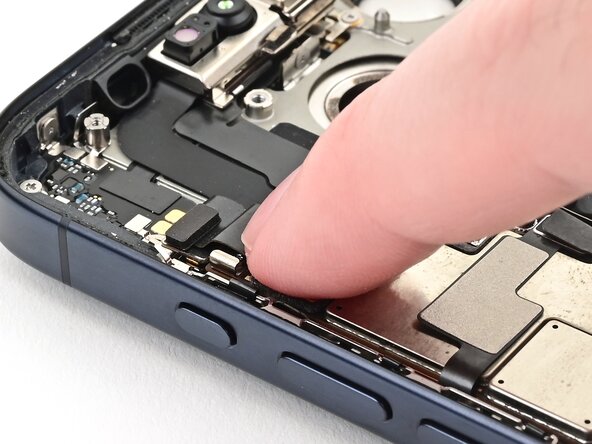
      • Use your finger or the flat end of a spudger to connect the front camera assembly's press connectors to their sockets on the top edge of the logic board.

      Ask FixBot

      Add Comment

    3. iPhone 15 Pro Front Camera Assembly Installation, Connect the microphone: step 3, image 1 of 2 iPhone 15 Pro Front Camera Assembly Installation, Connect the microphone: step 3, image 2 of 2
      • Use your finger to connect the microphone press connector to its socket on the top left corner of the logic board.

      Ask FixBot

      Add Comment

Finish Line

Cancel: I did not complete this guide.

Nick Schultz

Member since: 03/24/24

70,554 Reputation

363 Guides authored

0 Guide Comments

Add Comment

View Statistics:

Past 24 Hours: 0

Past 7 Days: 1

Past 30 Days: 3

All Time: 115