Introduction
Prerequisite only guide to install the ambient light sensor in an iPhone 15 Pro.
What you need
-
-
Tool used on this step:Tesa 61395 Tape$2.95
-
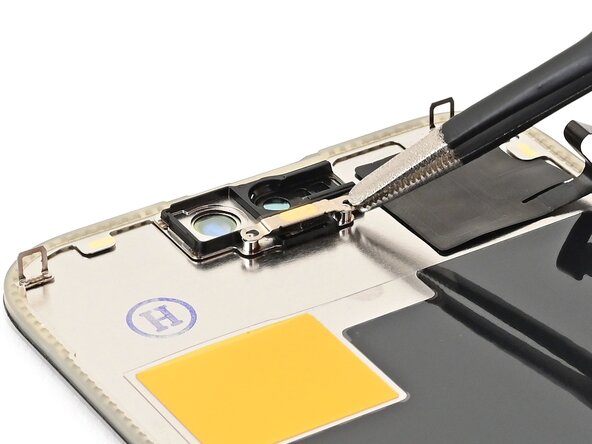
Use tweezers to reposition any adhesive that may have covered the ambient light sensor during removal. The adhesive should form a border around the raised white rectangle.
-
If the adhesive was damaged or stayed with the old screen, replace it with a 1 mm‑wide strip of thin, double-sided tape along its bottom border.
 Ask FixBot
-
-
-
Align the ambient light sensor with its recess in the back of the screen.
-
Use a spudger or your finger to place the ambient light sensor into its recess.
-
-
-
Tool used on this step:Tesa 61395 Tape$2.95
-
Use a hair dryer or heat gun to soften the adhesive under the ambient light sensor and its cable. It only needs to be warm—not hot.
-
Use your finger to press down the ambient light sensor cable.
-
-
-
Use tweezers or your fingers to place the ambient light sensor bracket, foam side down, aligned with its screw holes.
-
Use a Phillips screwdriver to install the two 1.4 mm‑long screws securing the ambient light sensor bracket.
-
-