Free Shipping on Domestic Orders $75+

iPhone 15 Pro Adhesive Compression

Prerequisite Only
This is a prerequisite-only guide! This guide is part of another procedure and isn’t meant to be used alone.
    1. iPhone 15 Pro Adhesive Compression, Press the back glass: step 1, image 1 of 3 iPhone 15 Pro Adhesive Compression, Press the back glass: step 1, image 2 of 3 iPhone 15 Pro Adhesive Compression, Press the back glass: step 1, image 3 of 3
      • To evenly compress the iPhone and strengthen the bond of the screen to the frame, you need to account for the camera bump.

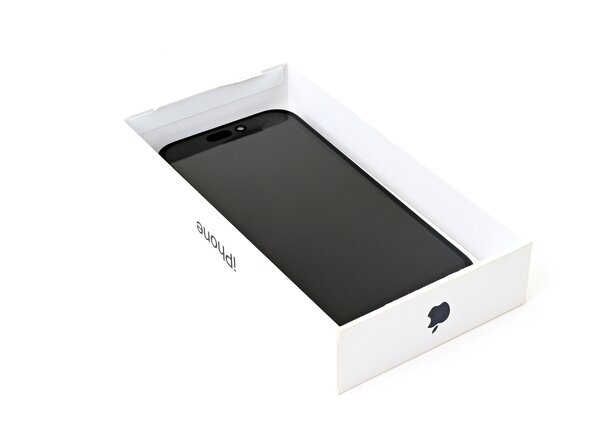
      • If you have the iPhone's original box, take the lid and place it on a flat surface.

      • If you don't have the original box, skip this step for an alternate method.

      • Place the iPhone screen-side-up in the lid of the box with the camera bump in its recess.

      • Find something close to the size of the iPhone, but taller than the sides of the box. Stack it on top of the iPhone, followed by a few heavy objects.

      • Leave the objects in place for at least thirty minutes, ideally overnight.

      Ask FixBot

      Add Comment

    2. iPhone 15 Pro Adhesive Compression: step 2, image 1 of 3 iPhone 15 Pro Adhesive Compression: step 2, image 2 of 3 iPhone 15 Pro Adhesive Compression: step 2, image 3 of 3
      • If you don't have the iPhone's original box, follow the these two steps for another method to evenly compress the screen.

      • Place the iPhone screen-side-down on a soft, flat surface.

      • Apply tape to the back glass to protect its finish.

      • Place three layers of coins or similarly thick objects on the tape along the edges of the back glass.

      • Evenly distribute the coins and make sure they are at least as thick as the camera bump.

      Ask FixBot

      Add Comment

    3. iPhone 15 Pro Adhesive Compression: step 3, image 1 of 1
      • Stack multiple books or other heavy objects on your iPhone.

      • The coins may leave an impression on the bottom object, so don't use anything valuable.

      • Leave the objects in place for at least thirty minutes, ideally overnight.

      Ask FixBot

      Add Comment

Conclusion

To reassemble your device, follow these instructions in reverse order.

Cancel: I did not complete this guide.

Nick Schultz

Member since: 03/24/24

65,240 Reputation

343 Guides authored

0 Guide Comments

Add Comment

View Statistics:

Past 24 Hours: 1

Past 7 Days: 3

Past 30 Days: 14

All Time: 71