
Toshiba Tecra Z50-A Hard Drive Replacement

Dominic Hryzan and 4 other contributors
Last updated on Jul 6, 2026
Views: 1.6K
View statistics:
- Past 24 Hours:
- 1
- Past 7 Days:
- 19
- Past 30 Days:
- 88
- All Time:
- 1,639
Comments: 0
No one has left comments on this guide. Will you be first?
Go to guide commentsCompleted: 2 3
2 people have marked this guide "completed." Will you be next?
3 people have marked this guide "completed." Including you — great job!
Favorites: 0 1
No one has favorited (and subscribed to) this guide. Will you be the first?
1 person has favorited (and subscribed to) this guide — and that's you!
Introduction
Go to step 1 ↓If your Toshiba Tecra Z50-A Hard Drive is experiencing overheating, power surges, and data loss, this can be the result of an old or damaged hard drive. The hard drive is responsible for long-term data storage, which includes applications, your files, and operating systems. It usually is a 2.5-inch SATA or SSD (Solid State Drive) hard drive. This guide will walk you through the steps to replacing your hard drive. Before starting, make sure all the data is backed up and have a clear working place for keeping everything organized.
What you need
Fix Kit
This kit contains all the parts and tools needed to complete this guide.

Parts


Tools
-
Anti-Static Mat4.9
-


-
-
-
Turn off the laptop.
-
Flip the laptop over so the bottom is facing upwards and the hinges are closest to you.
-
Remove the fifteen 5 mm screws from the back panel using a Phillips #0 screwdriver.
 Ask FixBot
-
-
-
Lift up back panel using your hands and remove it from the rest of the laptop.
-
-
-
-
-
Pull the wired cable up towards the top of the laptop to disconnect it from its socket on the motherboard.
-
-
-
Remove the single 2 mm screw from the corner of the laptop using a Phillips #0 screwdriver.
-
-
-
Remove the three 3 mm screws from the battery using a Phillips #0 screwdriver.
-
-
-


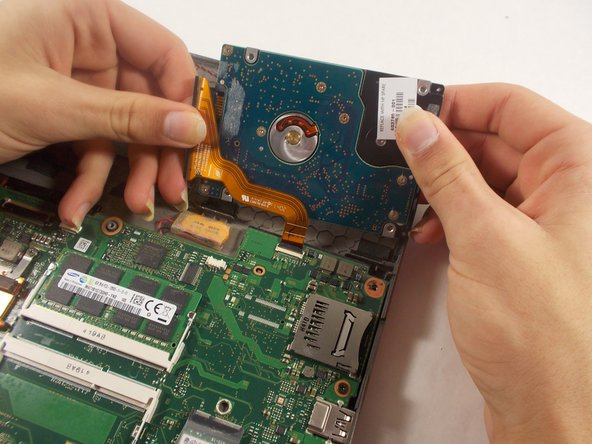
To reassemble your device, follow these instructions in reverse order.
Cancel: I did not complete this guide.
2 other people completed this guide.

Team

UMass Dartmouth, Team 2-4, Sinclaire Fall 2021 Member of UMass Dartmouth, Team 2-4, Sinclaire Fall 2021
UMASSD-SINCLAIRE-F21S2G4
3 Members
84 Guides authored
