Free Shipping on Domestic Orders $75+

ZTE Lever Front Camera Replacement

What you need

    1. ZTE Lever Front Camera Replacement, Battery: step 1, image 1 of 1
      • Remove the SD card and the Sim card from the device.

      • The Sim and SD cards are not shown here as our device did not come with them.

      Ask FixBot

      Add Comment

    2. ZTE Lever Front Camera Replacement: step 2, image 1 of 2 ZTE Lever Front Camera Replacement: step 2, image 2 of 2
      • Use an iFixit opening tool to separate the back from the device.

      Ask FixBot

      Add Comment

    3. ZTE Lever Front Camera Replacement: step 3, image 1 of 2 ZTE Lever Front Camera Replacement: step 3, image 2 of 2
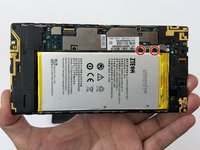
      • Remove the two 1.6mm Phillips #0 screws from the battery plug cover.

      • Remove the cover.

      Ask FixBot

      Add Comment

    4. ZTE Lever Front Camera Replacement: step 4, image 1 of 2 ZTE Lever Front Camera Replacement: step 4, image 2 of 2
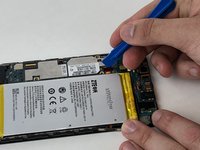
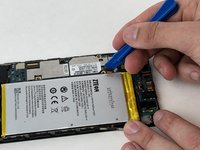
      • Disconnect the battery cable from the motherboard with a plastic opening tool.

      Ask FixBot

      Add Comment

    5. ZTE Lever Front Camera Replacement: step 5, image 1 of 1
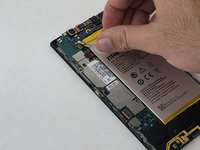
      • Use your hands, or a plastic opening tool, to pry the battery from the phone.

      Ask FixBot

      Add Comment

    1. ZTE Lever Front Camera Replacement, Front Camera: step 6, image 1 of 2 ZTE Lever Front Camera Replacement, Front Camera: step 6, image 2 of 2
      • Unscrew the three 1.6mm Philllips #0 screws on the plastic cover that are near the top edge of the phone by the camera.

      • Pry off the plastic cover using the iFixit opening tool.

      Ask FixBot

      Add Comment

    2. ZTE Lever Front Camera Replacement: step 7, image 1 of 2 ZTE Lever Front Camera Replacement: step 7, image 2 of 2
      • Unplug the front-facing camera press fit connector cable using the iFixit opening tool.

      • Remove the camera from the motherboard.

      Ask FixBot

      Add Comment

Conclusion

To reassemble your device, follow these instructions in reverse order.

Cancel: I did not complete this guide.

0 Guide Comments

Add Comment

View Statistics:

Past 24 Hours: 0

Past 7 Days: 5

Past 30 Days: 36

All Time: 426