Free Shipping on Domestic Orders $75+

iPad Pro 13" Lock Button Removal

Prerequisite Only
This is a prerequisite-only guide! This guide is part of another procedure and isn’t meant to be used alone.

What you need

    1. iPad Pro 13" Lock Button Removal, Remove the lock button screws: step 1, image 1 of 2 iPad Pro 13" Lock Button Removal, Remove the lock button screws: step 1, image 2 of 2
      • Use a JCIS or JIS 00 screwdriver to remove the two screws securing the lock button and bracket:

      • One 2.0 mm‑long screw securing the top of the bracket.

      • One 2.5 mm‑long screw securing the bottom of the bracket.

      • On models without cellular, remove the screws in this image instead.

      Ask FixBot

      Add Comment

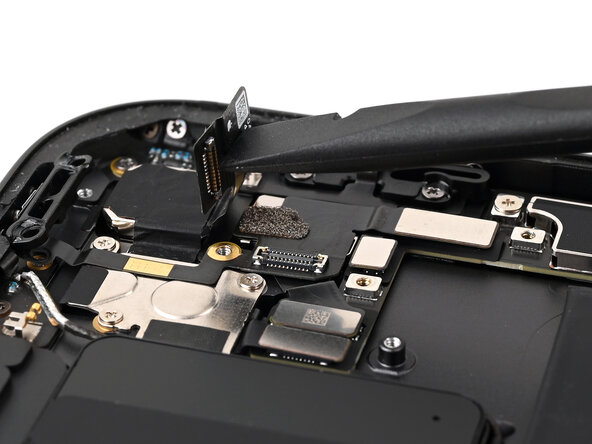
    2. iPad Pro 13" Lock Button Removal, Disconnect the camera: step 2, image 1 of 3 iPad Pro 13" Lock Button Removal, Disconnect the camera: step 2, image 2 of 3 iPad Pro 13" Lock Button Removal, Disconnect the camera: step 2, image 3 of 3
      • Place the flat end of a spudger between the camera ribbon cable and the top button ribbon cable, against the camera press connector.

      • While holding the top button ribbon cable down with the spudger, twist the spudger to disconnect the rear camera press connector.

      • Lift the camera ribbon cable up so it's nearly vertical to keep it out of the way.

      Ask FixBot

      Add Comment

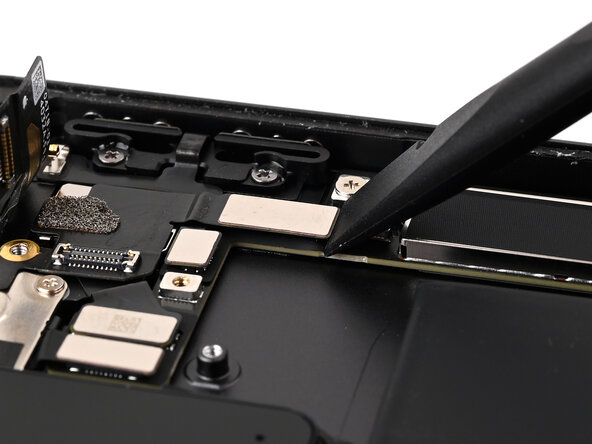
    3. iPad Pro 13" Lock Button Removal, Disconnect the lock button: step 3, image 1 of 2 iPad Pro 13" Lock Button Removal, Disconnect the lock button: step 3, image 2 of 2
      • Use the flat end of a spudger to disconnect the lock button press connector.

      Ask FixBot

      Add Comment

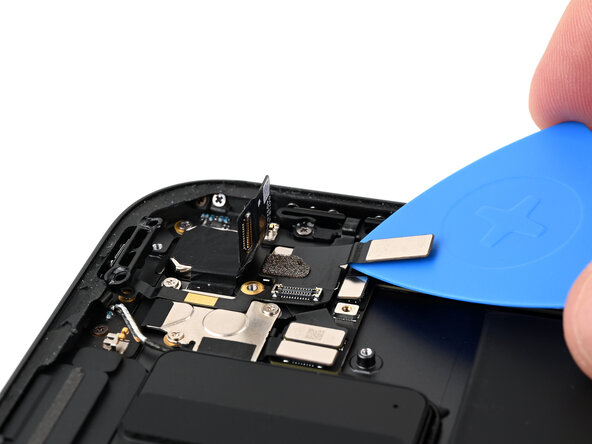
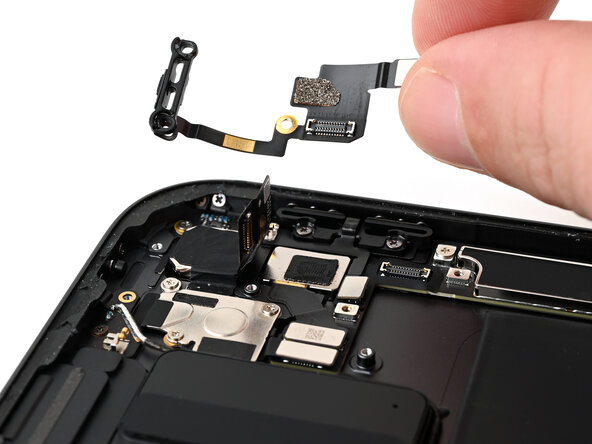
    4. iPad Pro 13" Lock Button Removal, Remove the lock button and bracket: step 4, image 1 of 3 iPad Pro 13" Lock Button Removal, Remove the lock button and bracket: step 4, image 2 of 3 iPad Pro 13" Lock Button Removal, Remove the lock button and bracket: step 4, image 3 of 3
      • Slide an opening pick under the lock button press connector.

      • While pressing the opening pick up against the lock button ribbon cable, slide the pick under the cable to release the adhesive securing it to the iPad.

      • There are two pads under the ribbon cable. Be careful not to peel these up. If you do peel them up, place them back in their original positions.

      • Remove the lock button and bracket.

      • If you're just replacing this part and not the lock button cap, skip the next 8 steps.

      Ask FixBot

      Add Comment

    5. iPad Pro 13" Lock Button Removal, Remove the lock button cap screws: step 5, image 1 of 2 iPad Pro 13" Lock Button Removal, Remove the lock button cap screws: step 5, image 2 of 2
      • Removing the screws in this step may cause the plunger, lock button, and retaining clip to fall out, so work carefully over a clean work surface.

      • Use a JIS 00 screwdriver to remove the two 1.6 mm‑long screws securing the lock button retaining clip.

      Ask FixBot

      Add Comment

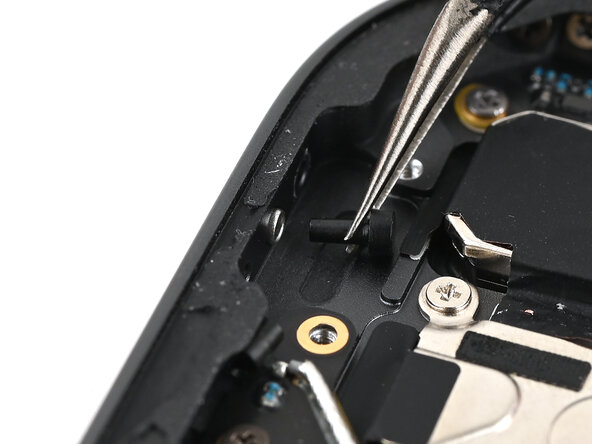
    6. iPad Pro 13" Lock Button Removal, Remove the plunger: step 6, image 1 of 2 iPad Pro 13" Lock Button Removal, Remove the plunger: step 6, image 2 of 2
      • Use tweezers or your fingers to remove the plunger from the lock button cap.

      • Note that this is small, non-magnetic, and round, so place it somewhere safe if you're not replacing it!

      Ask FixBot

      Add Comment

    7. iPad Pro 13" Lock Button Removal, Remove the lock button cap: step 7, image 1 of 3 iPad Pro 13" Lock Button Removal, Remove the lock button cap: step 7, image 2 of 3 iPad Pro 13" Lock Button Removal, Remove the lock button cap: step 7, image 3 of 3
      • Use a pair of angled tweezers or a spudger to gently push the lock button cap and retaining clip out of the iPad frame.

      • Alternatively, you can tilt the iPad to let these pieces fall out.

      Ask FixBot

      Add Comment

Finish Line

Cancel: I did not complete this guide.

Nick Schultz

Member since: 03/24/24

65,246 Reputation

343 Guides authored

0 Guide Comments

Add Comment

View Statistics:

Past 24 Hours: 1

Past 7 Days: 4

Past 30 Days: 15

All Time: 101