Free Shipping on Domestic Orders $75+

iPad Pro 12.9" 5th Gen Battery Blocking

Prerequisite Only
This is a prerequisite-only guide! This guide is part of another procedure and isn’t meant to be used alone.

What you need

    1. iPad Pro 12.9" 5th Gen Battery Blocking, Remove the logic board cover: step 1, image 1 of 3 iPad Pro 12.9" 5th Gen Battery Blocking, Remove the logic board cover: step 1, image 2 of 3 iPad Pro 12.9" 5th Gen Battery Blocking, Remove the logic board cover: step 1, image 3 of 3
      • The logic board cover is lightly adhered to the logic board.

      • Peel the cover off of the logic board to remove it.

      Ask FixBot

      Add Comment

    2. iPad Pro 12.9" 5th Gen Battery Blocking, Unfasten the battery connector: step 2, image 1 of 1
      • Use a Phillips screwdriver to remove the 1.7 mm-long screw securing the battery connector to the logic board.

      Ask FixBot

      Add Comment

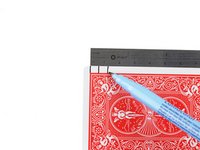
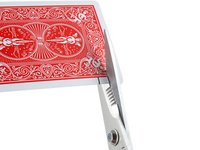
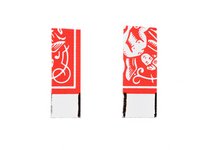
    3. iPad Pro 12.9" 5th Gen Battery Blocking, Create a battery blocker: step 3, image 1 of 3 iPad Pro 12.9" 5th Gen Battery Blocking, Create a battery blocker: step 3, image 2 of 3 iPad Pro 12.9" 5th Gen Battery Blocking, Create a battery blocker: step 3, image 3 of 3
      • Follow the next two steps to make a battery blocker out of a playing card.

      • Cut two 6 mm-wide strips from a playing card.

      • The strips should be at least one inch long.

      Ask FixBot

      Add Comment

    4. iPad Pro 12.9" 5th Gen Battery Blocking, Battery connector information: step 4, image 1 of 3 iPad Pro 12.9" 5th Gen Battery Blocking, Battery connector information: step 4, image 2 of 3 iPad Pro 12.9" 5th Gen Battery Blocking, Battery connector information: step 4, image 3 of 3
      • These photos show what the battery connector looks like underneath the logic board. Use these photos as a reference while you safely disconnect the battery.

      • Notice that the battery connector has cantilever springs on the logic board that press against the battery contact pads. Since both the logic board and battery are glued down, you'll need to slide something thin and flexible between the contact points to disconnect the battery.

      Ask FixBot

      Add Comment

    5. iPad Pro 12.9" 5th Gen Battery Blocking, Insert the card strips: step 5, image 1 of 3 iPad Pro 12.9" 5th Gen Battery Blocking, Insert the card strips: step 5, image 2 of 3 iPad Pro 12.9" 5th Gen Battery Blocking, Insert the card strips: step 5, image 3 of 3
      • Insert the card strips under each side of the battery connector.

      • If you can't slide the cards under the battery connector, use an opening pick to lift the connector enough to insert the card strips.

      Ask FixBot

      Add Comment

Finish Line

Cancel: I did not complete this guide.

Clay Eickemeyer

Member since: 09/19/22

107,802 Reputation

472 Guides authored

Team

Guide Team Member of Guide Team

Staff

10 Members

61,630 Guides authored

0 Guide Comments

Add Comment

View Statistics:

Past 24 Hours: 0

Past 7 Days: 2

Past 30 Days: 12

All Time: 128