Free Shipping on Domestic Orders $75+

iPad Mini Wi-Fi Front Facing Camera Cable Replacement

Prerequisite Only
This is a prerequisite-only guide! This guide is part of another procedure and isn’t meant to be used alone.

What you need

    1. iPad Mini Wi-Fi Front Facing Camera Cable Replacement, Front Facing Camera Cable: step 1, image 1 of 2 iPad Mini Wi-Fi Front Facing Camera Cable Replacement, Front Facing Camera Cable: step 1, image 2 of 2
      Tool used on this step:
      Tweezers
      $4.99
      Buy
      • Use a pair of tweezers to peel up and remove the small piece of tape covering the front-facing camera cable connector.

      Ask FixBot

      Add Comment

    2. iPad Mini Wi-Fi Front Facing Camera Cable Replacement: step 2, image 1 of 2 iPad Mini Wi-Fi Front Facing Camera Cable Replacement: step 2, image 2 of 2
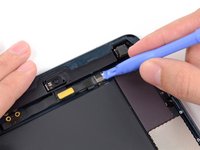
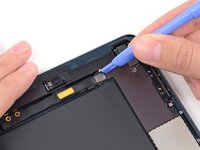
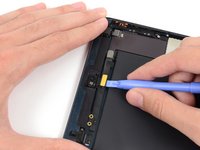
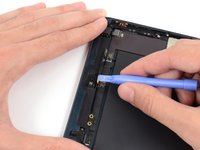
      • The front-facing camera cable connector is secured with pieces of tape that wrap up around the sides of the cable and are fastened to two small metal plates.

      • Use a plastic opening tool to gently pry the lower metal plate up from the front-facing camera cable connector.

      • Being careful not to break the plate or the tape attached to it, pry it up and fold it away from the front-facing camera cable connector.

      Ask FixBot

      Add Comment

    3. iPad Mini Wi-Fi Front Facing Camera Cable Replacement: step 3, image 1 of 2 iPad Mini Wi-Fi Front Facing Camera Cable Replacement: step 3, image 2 of 2
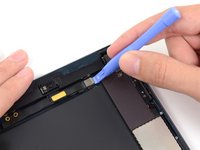
      • Gently pry the second metal plate up from the front-facing camera cable connector.

      • Again, carefully pry the plate up and away from the front-facing camera cable connector.

      Ask FixBot

      Add Comment

    4. iPad Mini Wi-Fi Front Facing Camera Cable Replacement: step 4, image 1 of 2 iPad Mini Wi-Fi Front Facing Camera Cable Replacement: step 4, image 2 of 2
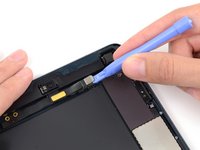
      • Use a plastic opening tool to pry the front-facing camera cable's connector up from its socket on the logic board.

      Ask FixBot

      Add Comment

    5. iPad Mini Wi-Fi Front Facing Camera Cable Replacement: step 5, image 1 of 2 iPad Mini Wi-Fi Front Facing Camera Cable Replacement: step 5, image 2 of 2
      • Gently fold the front-facing camera cable upwards (roughly at a 90-degree angle), exposing the bottom side of it.

      Ask FixBot

      Add Comment

Conclusion

To reassemble your device, follow these instructions in reverse order.

Cancel: I did not complete this guide.

Andrew Optimus Goldheart

Member since: 10/17/09

515,884 Reputation

406 Guides authored

Team

iFixit Member of iFixit

Staff

122 Members

72,401 Guides authored

0 Guide Comments

Add Comment

View Statistics:

Past 24 Hours: 0

Past 7 Days: 3

Past 30 Days: 26

All Time: 343