Free Shipping on Domestic Orders $75+

iPad Mini CDMA Small Metal Bracket Replacement

Prerequisite Only
This is a prerequisite-only guide! This guide is part of another procedure and isn’t meant to be used alone.

What you need

    1. iPad Mini CDMA Small Metal Bracket Replacement, Small Metal Bracket: step 1, image 1 of 3 iPad Mini CDMA Small Metal Bracket Replacement, Small Metal Bracket: step 1, image 2 of 3 iPad Mini CDMA Small Metal Bracket Replacement, Small Metal Bracket: step 1, image 3 of 3
      Tool used on this step:
      Tweezers
      $4.99
      Buy
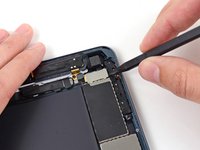
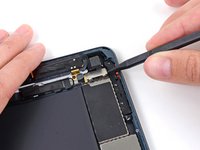
      • Use the tip of a spudger to start peeling up the right side of the black tape covering the small metal bracket.

      • Peel the tape up the rest of the way with tweezers, and remove it from the bracket.

      Ask FixBot

      Add Comment

    2. iPad Mini CDMA Small Metal Bracket Replacement: step 2, image 1 of 2 iPad Mini CDMA Small Metal Bracket Replacement: step 2, image 2 of 2
      • Use a plastic opening tool to push the metal bracket slightly to the left.

      Ask FixBot

      Add Comment

    3. iPad Mini CDMA Small Metal Bracket Replacement: step 3, image 1 of 2 iPad Mini CDMA Small Metal Bracket Replacement: step 3, image 2 of 2
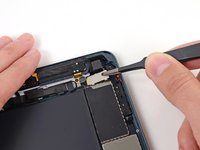
      • Use the tip of a spudger to lift up the lower side of the metal bracket.

      Ask FixBot

      Add Comment

    4. iPad Mini CDMA Small Metal Bracket Replacement: step 4, image 1 of 2 iPad Mini CDMA Small Metal Bracket Replacement: step 4, image 2 of 2
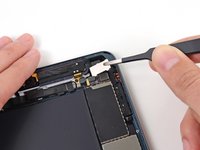
      • Grab the bracket with tweezers and lift it up out of the iPad.

      • During reassembly, hook the top edge of the plate in place first, then lower the bottom into its slots.

      Ask FixBot

      Add Comment

Conclusion

To reassemble your device, follow these instructions in reverse order.

Cancel: I did not complete this guide.

0 Guide Comments

Add Comment

View Statistics:

Past 24 Hours: 1

Past 7 Days: 8

Past 30 Days: 24

All Time: 470