Free Shipping on Domestic Orders $75+

iPad 2 GSM Front Facing Camera Replacement

Prerequisite Only
This is a prerequisite-only guide! This guide is part of another procedure and isn’t meant to be used alone.

What you need

    1. iPad 2 GSM Front Facing Camera Replacement, Front Facing Camera: step 1, image 1 of 1
      • Remove the piece of tape highlighted in red.

      • Be careful not to damage the camera, microphone, or headphone jack ribbon cables as you remove the tape.

      Ask FixBot

      Add Comment

    2. iPad 2 GSM Front Facing Camera Replacement: step 2, image 1 of 1
      • Peel the front camera off the foam adhesive securing it to the rear panel.

      Ask FixBot

      Add Comment

    3. iPad 2 GSM Front Facing Camera Replacement: step 3, image 1 of 1
      • Pull the front facing camera cable out from the channel cut into the rear panel.

      • Remove the front facing camera from your iPad.

      Ask FixBot

      Add Comment

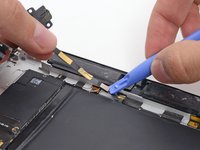
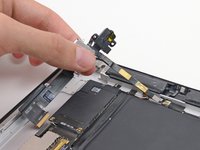
    4. iPad 2 GSM Front Facing Camera Replacement: step 4, image 1 of 2 iPad 2 GSM Front Facing Camera Replacement: step 4, image 2 of 2
      • Use a plastic opening tool to disconnect the microphone cable connector.

      • Remove the headphone jack/SIM slot from the device.

      Ask FixBot

      Add Comment

Conclusion

To reassemble your device, follow these instructions in reverse order.

Cancel: I did not complete this guide.

Andrew Optimus Goldheart

Member since: 10/17/09

515,900 Reputation

406 Guides authored

Team

iFixit Member of iFixit

Staff

122 Members

72,401 Guides authored

0 Guide Comments

Add Comment

View Statistics:

Past 24 Hours: 0

Past 7 Days: 1

Past 30 Days: 14

All Time: 444