Free Shipping on Domestic Orders $75+

iMac Intel 21.5" EMC 2428 Access Door Replacement

Views: 9.3K

View statistics:

Past 24 Hours:
4
Past 7 Days:
28
Past 30 Days:
106
All Time:
9,309
Comments: 4

4 comments on steps.

Completed: 14

14 people have marked this guide "completed." Will you be next?

Favorites: 9

9 people have favorited (and subscribed to) this guide. Will you be next?

Time Required: No estimate
Difficulty: Easy
iMac Intel 21.5" EMC 2428 Access Door Replacement

Introduction

Go to step 1 ↓

Use this guide to replace the access door on the bottom edge of your iMac.

What you need

Tools

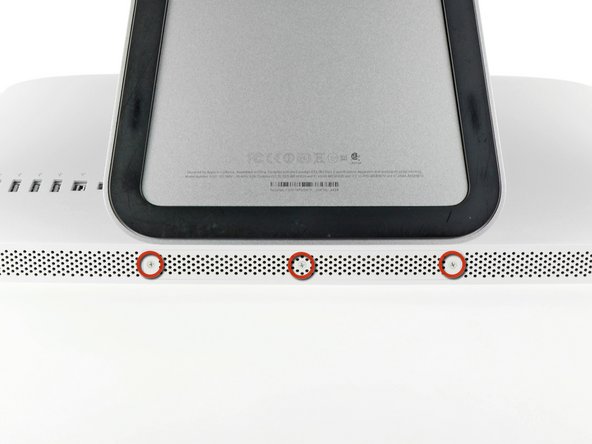
    1. iMac Intel 21.5" EMC 2428 Access Door Replacement, Access Door: step 1, image 1 of 2 iMac Intel 21.5" EMC 2428 Access Door Replacement, Access Door: step 1, image 2 of 2
      • Unplug your iMac's AC cord along with any peripheral devices.

      • Lay your iMac face-down on a soft, clean surface as shown.

      • Be sure there isn't any dirt or debris on your work surface, as it may scratch the glass panel on the front of your iMac. We recommend placing a towel between the iMac and the work surface.

      • Loosen the three Phillips screws securing the access door to the bottom edge of your iMac.

      • All three screws will remain captive in the access door.

      • Remove the access door.

      Ask FixBot

      Add Comment

Conclusion

To reassemble your device, follow these instructions in reverse order.

Cancel: I did not complete this guide.

14 other people completed this guide.

0 Guide Comments

Add Comment

View Statistics:

Past 24 Hours: 4

Past 7 Days: 28

Past 30 Days: 106

All Time: 9,309