Free Shipping on Domestic Orders $75+

iMac 27" 2017 Hard Drive Assembly Replacement

Prerequisite Only
This is a prerequisite-only guide! This guide is part of another procedure and isn’t meant to be used alone.

What you need

    1. iMac 27" 2017 Hard Drive Assembly Replacement, Remove the hard drive: step 1, image 1 of 2 iMac 27" 2017 Hard Drive Assembly Replacement, Remove the hard drive: step 1, image 2 of 2
      • Pull straight up on the SATA data/power cable to disconnect it from the drive.

      Ask FixBot

      Add Comment

    2. iMac 27" 2017 Hard Drive Assembly Replacement: step 2, image 1 of 1
      • Remove two 7.3 mm T8 screws securing the left hard drive bracket to the rear case.

      Ask FixBot

      Add Comment

    3. iMac 27" 2017 Hard Drive Assembly Replacement: step 3, image 1 of 3 iMac 27" 2017 Hard Drive Assembly Replacement: step 3, image 2 of 3 iMac 27" 2017 Hard Drive Assembly Replacement: step 3, image 3 of 3
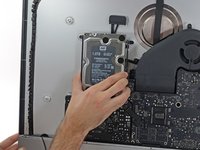
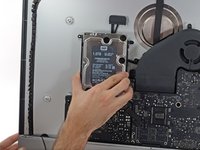
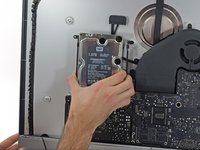
      • Grab the hard drive and left hard drive bracket together.

      • Tilt the left side up away from the rear case, and slide the assembly to the left.

      • Remove the hard drive and left hard drive bracket from the iMac.

      Ask FixBot

      Add Comment

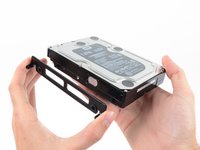
    4. iMac 27" 2017 Hard Drive Assembly Replacement: step 4, image 1 of 2 iMac 27" 2017 Hard Drive Assembly Replacement: step 4, image 2 of 2
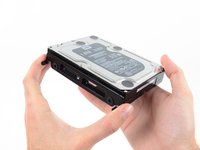
      • Remove the left hard drive bracket.

      Ask FixBot

      Add Comment

Conclusion

To reassemble your device, follow these instructions in reverse order.

Cancel: I did not complete this guide.

Adam O'Camb

Member since: 04/11/15

225,515 Reputation

415 Guides authored

0 Guide Comments

Add Comment

View Statistics:

Past 24 Hours: 2

Past 7 Days: 3

Past 30 Days: 14

All Time: 348