
iBook G4 12" 1.33 GHz RAM Replacement

Walter Galan and
Last updated on Sep 25, 2017
Views: 25K
View statistics:
- Past 24 Hours:
- 6
- Past 7 Days:
- 29
- Past 30 Days:
- 121
- All Time:
- 25,413
Comments: 3
1 comment on steps, 2 guide comments.
Go to guide commentsCompleted: 38 39
38 people have marked this guide "completed." Will you be next?
39 people have marked this guide "completed." Including you — great job!
Favorites: 8 9
8 people have favorited (and subscribed to) this guide. Will you be next?
9 people have favorited (and subscribed to) this guide — including you!
Featured Guide
This guide has been found to be exceptionally cool by the iFixit staff.
Introduction
Go to step 1 ↓One RAM slot will accept PC2700 chips up to 1 GB.
What you need
Parts
Tools


-
-
-
Lay your iBook upside down on a flat surface.
-
Use a coin to rotate the battery locking screw 90 degrees clockwise.
-
Lift the battery out of the computer.
 Ask FixBot
-
-
-
-
-
Pull the keyboard release tabs toward you and lift up on the keyboard until it pops free.
-
Flip the keyboard over, away from the screen, and rest it face-down on the trackpad area.
-
-
-
-
Pull the keyboard cable up from the logic board, holding the cable as close to the connector as possible.
-
-
-
-
-
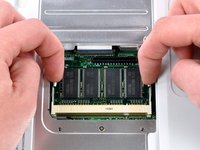
Release the tabs on each side of the RAM chip at the same time. These tabs lock the chip in place and releasing them will cause the chip to "pop" up.
-
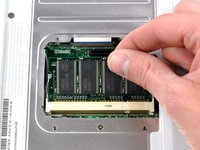
Pull the chip directly out from its connectors.
-
-


To reassemble your device, follow these instructions in reverse order.
Cancel: I did not complete this guide.
38 other people completed this guide.
Attached Documents

2 Guide Comments
Easy-to-follow instructions. I used them to add 1GB RAM to my iBook G4. Thanks to your instructions, I was able to do the job myself. After contacting three Mac repair shops and either not having anyone call me back or else offering to do it for $40 or $109 at a specialty place, I decided to trust your guide and do it myself. Success!
