Free Shipping on Domestic Orders $75+

iBook G3 14" LCD Cover Replacement

Prerequisite Only
This is a prerequisite-only guide! This guide is part of another procedure and isn’t meant to be used alone.

What you need

    1. iBook G3 14" LCD Cover Replacement, LCD Cover: step 1, image 1 of 2 iBook G3 14" LCD Cover Replacement, LCD Cover: step 1, image 2 of 2
      • Remove the pieces of readily removable tape from around the perimeter of the display.

      • Carefully remove the aluminum tape covering the display data cable connection.

      Ask FixBot

      Add Comment

    2. iBook G3 14" LCD Cover Replacement: step 2, image 1 of 2 iBook G3 14" LCD Cover Replacement: step 2, image 2 of 2
      • Remove the single screw inserted through the piece of EMI tape near the bottom edge of the display.

      • Use the tip of a spudger to remove the small washer under the screw you just removed.

      Ask FixBot

      Add Comment

    3. iBook G3 14" LCD Cover Replacement: step 3, image 1 of 1
      • Peel the aluminum/EMI tape off the cast aluminum frame of the clutch hinges.

      • It is not necessary to peel the tape off the thin steel LCD cover.

      Ask FixBot

      Add Comment

    4. iBook G3 14" LCD Cover Replacement: step 4, image 1 of 2 iBook G3 14" LCD Cover Replacement: step 4, image 2 of 2
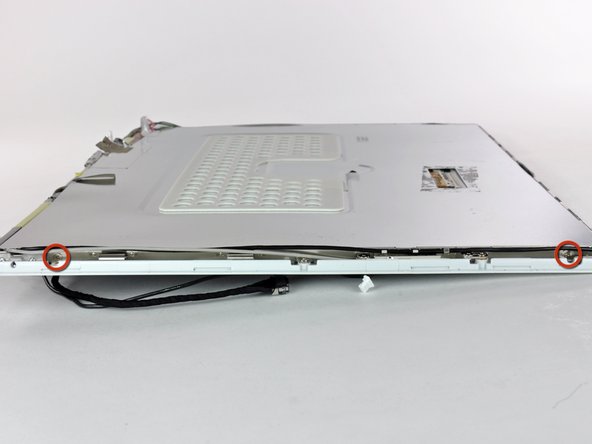
      • Remove the two Phillips screws securing each side of the LCD to the clutch hinge frame (four screws total).

      Ask FixBot

      Add Comment

    5. iBook G3 14" LCD Cover Replacement: step 5, image 1 of 1
      • Lift the thin steel LCD cover off the LCD.

      Ask FixBot

      Add Comment

Conclusion

To reassemble your device, follow these instructions in reverse order.

Cancel: I did not complete this guide.

One other person completed this guide.

0 Guide Comments

Add Comment

View Statistics:

Past 24 Hours: 1

Past 7 Days: 4

Past 30 Days: 15

All Time: 360