Free Shipping on Domestic Orders $75+

iPhone 4S Speaker Enclosure Assembly Replacement

Prerequisite Only
This is a prerequisite-only guide! This guide is part of another procedure and isn’t meant to be used alone.

What you need

    1. iPhone 4S Speaker Enclosure Assembly Replacement, Speaker Enclosure Assembly: step 1, image 1 of 1
      • Remove the two 2.4 mm Phillips screws from the sides of the speaker enclosure assembly.

      Ask FixBot

      Add Comment

    2. iPhone 4S Speaker Enclosure Assembly Replacement: step 2, image 1 of 1
      • Remove the small plastic bracket that was installed under the screw closest to the dock connector cable.

      Ask FixBot

      Add Comment

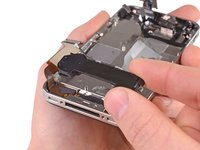
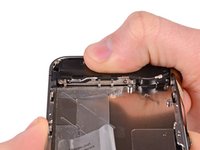
    3. iPhone 4S Speaker Enclosure Assembly Replacement: step 3, image 1 of 2 iPhone 4S Speaker Enclosure Assembly Replacement: step 3, image 2 of 2
      • Remove the speaker enclosure assembly from the iPhone.

      • Before reinstalling the speaker enclosure assembly's screws, be sure the Wi-Fi grounding fingers are installed below the lip in the iPhone's metal case as seen in the second picture.

      • Before reassembly, be sure to clean all metal-to-metal contact points between the grounding fingers of the Wi-Fi antenna and the case of the iPhone with a de-greaser such as windex or isopropyl alcohol. The oils on your fingers have the potential to cause wireless interference issues.

      Ask FixBot

      Add Comment

Conclusion

To reassemble your device, follow these instructions in reverse order.

Cancel: I did not complete this guide.

3 other people completed this guide.

0 Guide Comments

Add Comment

View Statistics:

Past 24 Hours: 0

Past 7 Days: 4

Past 30 Days: 20

All Time: 1,932