
Lenovo Thinkpad x240 Internal Battery Replacement

Mohammed Alsaadi and 3 other contributors
Last updated on Aug 10, 2021
Views: 19K
View statistics:
- Past 24 Hours:
- 9
- Past 7 Days:
- 36
- Past 30 Days:
- 171
- All Time:
- 19,171
Comments: 2
2 guide comments.
Go to guide commentsCompleted: 8 9
8 people have marked this guide "completed." Will you be next?
9 people have marked this guide "completed." Including you — great job!
Favorites: 0 1
No one has favorited (and subscribed to) this guide. Will you be the first?
1 person has favorited (and subscribed to) this guide — and that's you!
Better Introduction
Improve this guide by completing or revising its introduction.
Introduction
Go to step 1 ↓Having issues with your battery life? No worries! Follow this simple guide to replace the internal battery.
What you need
Parts

Tools


-
-
-
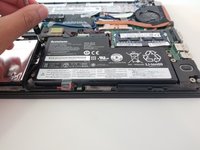
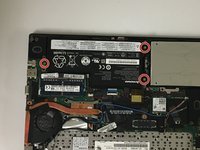
Locate the internal battery pack and unscrew the 3 0.2 mm screws holding it in place.
-
-
-
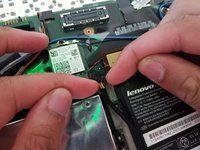
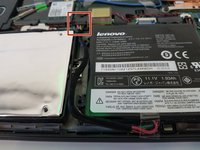
Unplug the connector cable that connects the internal battery pack to the laptop.
-
-

 Ask FixBot





To reassemble your device, follow these instructions in reverse order.
Cancel: I did not complete this guide.
8 other people completed this guide.

Team

University of North Texas, Team S6-G2, Thomas Fall 2017 Member of University of North Texas, Team S6-G2, Thomas Fall 2017
UNT-THOMAS-F17S6G2
3 Members
36 Guides authored
2 Guide Comments
“0.2 mm screws”? There is no such thing as 0.2mm screws! I can only assume that you’ve meant to write M2 screws though since you messed that up I’m wondering if it’s really M2 screws or if it could be M2.5 or even M3 screws instead.
This is crucial information to all those people who only have a battery dummy in their original configuration needing to figure out what screws to buy to secure the new actual internal battery inside the case.
