
ZTE Majesty Screen Replacement

Jake Cogburn and
Last updated on Jan 3, 2017
Views: 3.7K
View statistics:
- Past 24 Hours:
- 6
- Past 7 Days:
- 22
- Past 30 Days:
- 80
- All Time:
- 3,714
Comments: 1
1 comment on steps.
Completed: 10 11
10 people have marked this guide "completed." Will you be next?
11 people have marked this guide "completed." Including you — great job!
Favorites: 7 8
7 people have favorited (and subscribed to) this guide. Will you be next?
8 people have favorited (and subscribed to) this guide — including you!
Action Shots
Be an action hero! This guide needs images that better demonstrate how to perform specific actions.
Better Introduction
Improve this guide by completing or revising its introduction.
What you need
Tools


-
-
-
Remove the back cover of your phone by placing your finger in the slot located on the back bottom left handed side of the phone.
-
Remove the battery.
 Ask FixBot
-
-
-
Remove the 9 Phillips- Head screws with a Ph000 screwdriver
-
Using your pry tool, slide it along the edges of the phone closest to the screen. This releases the screen from the housing.
-
-
-
-
Use your pick to separate screen from the LCD and motherboard.
-
Replace old screen with new screen.
-
Before you put all necessary parts back on your device place the battery back in the slot it goes and power on your device. This ensures that your screen is working properly.
-
-


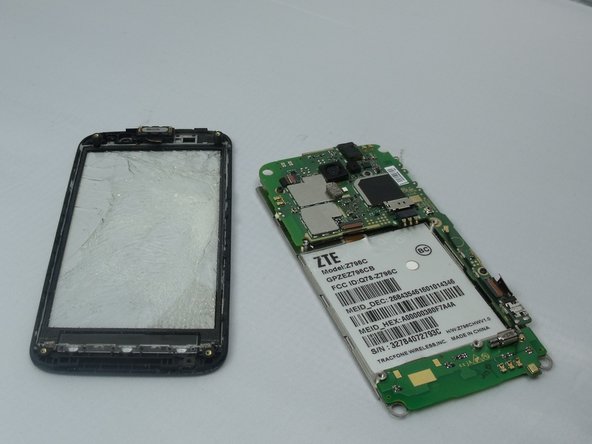


To reassemble your device, follow these instructions in reverse order.
Cancel: I did not complete this guide.
10 other people completed this guide.

Team

South Arkansas Community College, Team 1-2, Mitchell Spring 2016 Member of South Arkansas Community College, Team 1-2, Mitchell Spring 2016
SACC-MITCHELL-S16S1G2
5 Members
36 Guides authored
