Introduction
If your ZTE Majesty (model Z796C) smartphone struggles to hold a charge, shuts off unexpectedly, or displays signs of a swollen battery, this guide will help you replace the battery safely and effectively.
The battery is essential for powering your device and ensuring its portable use. Over time, batteries may degrade, which can lead to reduced performance or potential safety hazards. Replacing your battery can resolve problems such as short battery life, overheating, or a device that fails to power on.
Before starting, ensure your phone is turned off and disconnected from any external power source. If your battery is swollen, handle it with caution to avoid punctures. Refer to this guide on lithium-ion battery safety for detailed instructions on handling and disposing of swollen batteries.
This guide is beginner-friendly and uses only simple tools like a plastic opening tool.
By following these steps, you can easily replace the battery of your ZTE Majesty to extend your phone's lifespan and maintain its performance.
What you need
-
-
-
Place your phone in the palm of your hand.
-
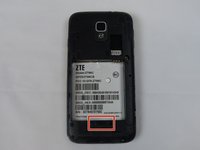
You will notice the groove and that the back detaches from the phone.
 Ask FixBot
-
-
-
-
Using either your finger or a plastic opening tool, pry the back off to reveal the battery.
-
-


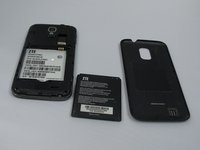
To reassemble your device, follow these instructions in reverse order.
Cancel: I did not complete this guide.
One other person completed this guide.

Team

South Arkansas Community College, Team 1-2, Mitchell Spring 2016 Member of South Arkansas Community College, Team 1-2, Mitchell Spring 2016
SACC-MITCHELL-S16S1G2
5 Members
36 Guides authored
