Free Shipping on Domestic Orders $75+

ZD-N Plus Wireless Controller Left Joystick Replacement

What you need

  1. ZD-N Plus Wireless Controller Left Joystick Replacement, Back Panel: step 1, image 1 of 1
    • Remove the seven 12mm JIS #00 screws that hold the back panel in place.

    Ask FixBot
  2. ZD-N Plus Wireless Controller Left Joystick Replacement: step 2, image 1 of 2 ZD-N Plus Wireless Controller Left Joystick Replacement: step 2, image 2 of 2
    • Lift up on the back panel of the ZD-N Plus to remove it from the rest of the controller.

    Ask FixBot
  3. ZD-N Plus Wireless Controller Left Joystick Replacement, Battery: step 3, image 1 of 1
    • Use an opening tool to pry the battery from its original position.

    • The battery is glued on, so this may take some effort.

    Ask FixBot
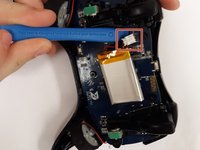
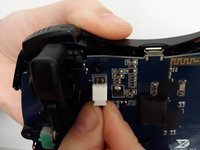
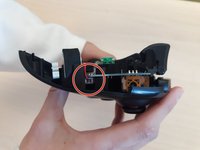
  4. ZD-N Plus Wireless Controller Left Joystick Replacement: step 4, image 1 of 2 ZD-N Plus Wireless Controller Left Joystick Replacement: step 4, image 2 of 2
    • Use an opening tool to pry the connector away from the two metallic prongs.

    • The parts are built to stay together, so this may take some effort.

    • Be careful to not warp the prongs in the process.

    Ask FixBot
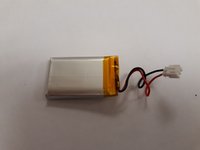
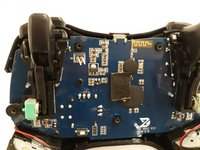
  5. ZD-N Plus Wireless Controller Left Joystick Replacement: step 5, image 1 of 2 ZD-N Plus Wireless Controller Left Joystick Replacement: step 5, image 2 of 2
    • Remove the battery from the controller.

    Ask FixBot
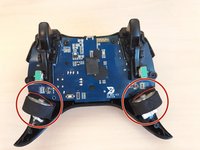
  6. ZD-N Plus Wireless Controller Left Joystick Replacement, Rumble Motor: step 6, image 1 of 2 ZD-N Plus Wireless Controller Left Joystick Replacement, Rumble Motor: step 6, image 2 of 2
    • Remove the electrical connector attaching each rumble motor to the controller.

    • Lift up on the circular section of the rumble to remove it from the controller.

    Ask FixBot
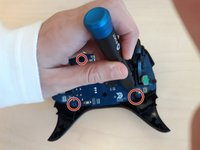
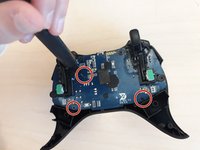
  7. ZD-N Plus Wireless Controller Left Joystick Replacement, Motherboard: step 7, image 1 of 2 ZD-N Plus Wireless Controller Left Joystick Replacement, Motherboard: step 7, image 2 of 2
    • Remove the three 1.2mm JIS #00 screws that hold the motherboard in place.

    Ask FixBot
  8. ZD-N Plus Wireless Controller Left Joystick Replacement: step 8, image 1 of 1
    • Lift the motherboard out of the controller.

    Ask FixBot
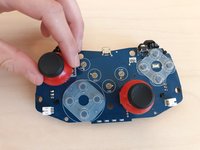
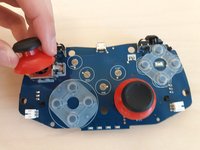
  9. ZD-N Plus Wireless Controller Left Joystick Replacement, Left Joystick: step 9, image 1 of 2 ZD-N Plus Wireless Controller Left Joystick Replacement, Left Joystick: step 9, image 2 of 2
    • Pull up on the left joystick to remove it from the motherboard. The plastic piece will unclip easily.

    Ask FixBot
Conclusion

To reassemble your device, follow these instructions in reverse order.

One other person completed this guide.

0 Guide Comments

Add Comment

View Statistics:

Past 24 Hours: 0

Past 7 Days: 6

Past 30 Days: 43

All Time: 1,160