Free Shipping on Domestic Orders $75+

Xiaomi ROBOROCK S50200 Battery Repair

What you need

  1. Xiaomi ROBOROCK S50200 Battery Repair, Turning off the Roborock: step 1, image 1 of 2 Xiaomi ROBOROCK S50200 Battery Repair, Turning off the Roborock: step 1, image 2 of 2
    • Turn off the device by pressing and holding the power button.

    Ask FixBot

    Add Comment

  2. Xiaomi ROBOROCK S50200 Battery Repair, Remove the dustbin: step 2, image 1 of 1
    • Open the cover upwards.

    • Lift the dustbin upward to remove it.

    Ask FixBot

    Add Comment

  3. Xiaomi ROBOROCK S50200 Battery Repair, Removing the main brush: step 3, image 1 of 2 Xiaomi ROBOROCK S50200 Battery Repair, Removing the main brush: step 3, image 2 of 2
    • Remove the main brush holder by pressing both locks inward and lifting it up.

    • Remove the main brush.

    Ask FixBot

    Add Comment

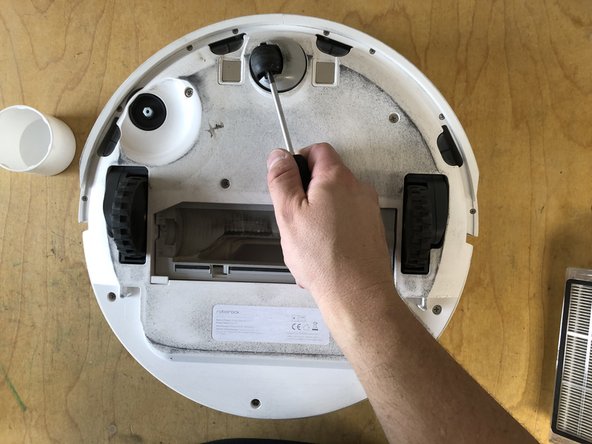
  4. Xiaomi ROBOROCK S50200 Battery Repair, Removing the side brush: step 4, image 1 of 3 Xiaomi ROBOROCK S50200 Battery Repair, Removing the side brush: step 4, image 2 of 3 Xiaomi ROBOROCK S50200 Battery Repair, Removing the side brush: step 4, image 3 of 3
    • Remove the screw holding the side brush.

    • You don't need to completely unscrew the screw; simply loosen it and remove it with the brush.

    • Remove the side brush along with the screw by lifting it upward.

    Ask FixBot

    Add Comment

  5. Xiaomi ROBOROCK S50200 Battery Repair, Removing the front wheel.: step 5, image 1 of 3 Xiaomi ROBOROCK S50200 Battery Repair, Removing the front wheel.: step 5, image 2 of 3 Xiaomi ROBOROCK S50200 Battery Repair, Removing the front wheel.: step 5, image 3 of 3
    • Lift the front wheel with the screwdriver.

    • Completely pull the front wheel upward to remove it.

    Ask FixBot

    Add Comment

  6. Xiaomi ROBOROCK S50200 Battery Repair, Remove the bottom panel: step 6, image 1 of 3 Xiaomi ROBOROCK S50200 Battery Repair, Remove the bottom panel: step 6, image 2 of 3 Xiaomi ROBOROCK S50200 Battery Repair, Remove the bottom panel: step 6, image 3 of 3
    • Remove the seven screws holding the bottom panel.

    • Lift the bottom cover up.

    Ask FixBot

    Add Comment

  7. Xiaomi ROBOROCK S50200 Battery Repair, Remove the battery: step 7, image 1 of 2 Xiaomi ROBOROCK S50200 Battery Repair, Remove the battery: step 7, image 2 of 2
    • Lift the battery using the two tabs.

    • Disconnect the connector.

    Ask FixBot

    Add Comment

Conclusion

Follow the steps in reverse order to reassemble your device.

Cancel: I did not complete this guide.

8 other people completed this guide.

Special thanks to these translators:

de en

100%

These translators are helping us fix the world! Want to contribute?
Start translating ›

hainzy

Member since: 03/23/23

10,770 Reputation

47 Guides authored

0 Guide Comments

Add Comment

View Statistics:

Past 24 Hours: 2

Past 7 Days: 16

Past 30 Days: 87

All Time: 6,315