Introduction
This guide demonstrates how to remove the SSD from the Lenovo IdeaPad 100S-141BR. In cases of hard drive or SSD issues, either failure to boot or internal damage, removing the defective hardware may be necessary. The removal process is simple and requires little to no experience to complete. Before beginning the repair process, power down the device and remove any external peripherals or charging cords.
What you need
-
-
-
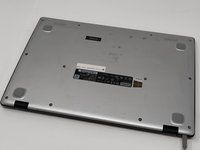
Remove the eight 4mm PH00 screws.
-
Remove the four 2mm PH00 screws.
 Ask FixBot
-
-
-
-
For safety reasons, disconnect the wires connecting the battery to the motherboard with a nylon spudger.
-
-




To reassemble your device, follow these instructions in reverse order.
Cancel: I did not complete this guide.
7 other people completed this guide.

Team

University of Memphis, Team S1-G3, Kim Spring 2019 Member of University of Memphis, Team S1-G3, Kim Spring 2019
UM-KIM-S19S1G3
3 Members
60 Guides authored
3 Guide Comments
WHAT DO i REPLACE THE ssd WITH ONCE REMOVED? I WANT TO UPGRADE TO A 1TB DRIVE. WHAT DO YOU SUGGEST FOR MY LENOVO 110S-141BR LAPTOP?
I replaced with an ssd but the laptop is not recognizing it
merci beaucoup
