
Xbox 360 Motherboard Replacement

Walter Galan and 5 other contributors
Last updated on Mar 29, 2024
Views: 1.6K
View statistics:
- Past 24 Hours:
- 1
- Past 7 Days:
- 11
- Past 30 Days:
- 28
- All Time:
- 1,585
Comments: 6
6 comments on steps.
Completed: 0 1
No one has marked this guide "completed." Will you be the first?
1 person has marked this guide "completed." It's you — great job!
Favorites: 3 4
3 people have favorited (and subscribed to) this guide. Will you be next?
4 people have favorited (and subscribed to) this guide — including you!
Introduction
Go to step 1 ↓This guide is an internal prereq.
What you need


-
-
-
Use the flat end of a spudger to release the clips securing the RF module shield along the top and the left edge of the RF module.
-
Remove the RF module shield from the console.
 Ask FixBot
-
-
-
Remove three 5.6 mm T8 Torx screws securing the RF module to the metal chassis.
-
-
-
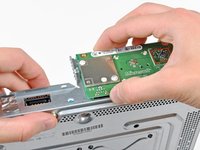
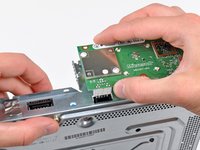
Grasp the RF module and lift it straight up to disconnect it from its socket on the motherboard.
-
Remove the RF module from the console.
-
-
-
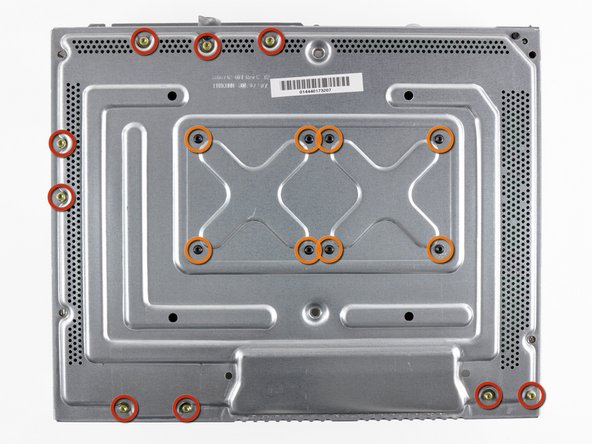
Remove the following screws securing the motherboard to the metal casing:
-
Nine gold 11 mm T10 Torx screws.
-
Eight black 5.6 mm T8 Torx screws.
-
-
-
-
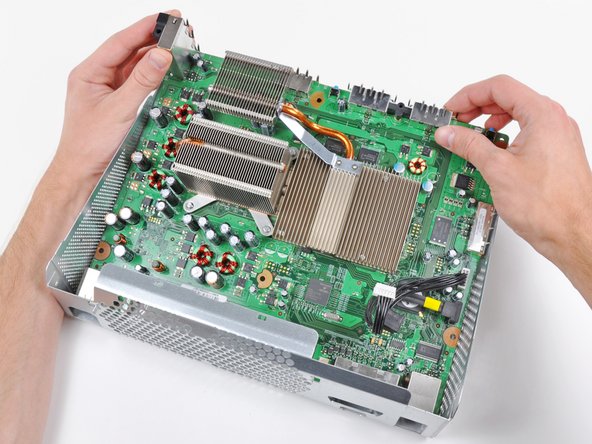
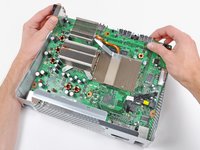
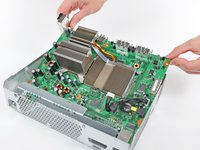
Lift the motherboard assembly from its front edge.
-
Remove the motherboard assembly from the metal casing.
-
-



To reassemble your device, follow these instructions in reverse order.

