
Toshiba Satellite 1805-S177 Hard Drive Replacement

Hannah and 9 other contributors
Last updated on Oct 31, 2018
Views: 4.8K
View statistics:
- Past 24 Hours:
- 1
- Past 7 Days:
- 29
- Past 30 Days:
- 107
- All Time:
- 4,848
Comments: 1
1 guide comment.
Go to guide commentsCompleted: 0 1
No one has marked this guide "completed." Will you be the first?
1 person has marked this guide "completed." It's you — great job!
Favorites: 1 2
1 person has favorited (and subscribed to) this guide. Will you be next?
2 people have favorited (and subscribed to) this guide — including you!
Missing Prerequisites
This guide is missing information on how to start the process. Make a prerequisite guide!
Introduction
Go to step 1 ↓This guide tells you how to replace the current hard drive in the laptop with one of better storage or functionality.
What you need
Tools

-
-
-
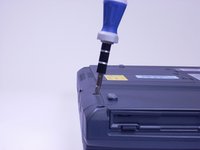
Look at the bottom of the laptop. Using a Phillips screwdriver, unscrew and remove the screw labeled F4, located on the cover of the hard drive.
 Ask FixBot
-
-
-
Placing your finger on the raised grip, push up on the hard drive cover. This will remove the hard drive cover from the laptop.
-
-
-
Using a Phillips screwdriver, unscrew and remove the screw surrounded by the white plastic.
-
-
-
-
Pull the white plastic out toward you. This should remove the hard drive tray from the laptop.
-
-




To reassemble your device, follow these instructions in reverse order.

Team

Cal Poly, Team 3-5, Johann Summer 2010 Member of Cal Poly, Team 3-5, Johann Summer 2010
CPSU-JOHANN-R10S3G5
4 Members
96 Guides authored
