15% Off Selected iFixit Tools — Limited Time
Free Shipping on Domestic Orders $75+

iPhone 4S Dock Connector Cable Replacement

Prerequisite Only
This is a prerequisite-only guide! This guide is part of another procedure and isn’t meant to be used alone.

What you need

  1. iPhone 4S Dock Connector Cable Replacement, Dock Connector Cable: step 1, image 1 of 2 iPhone 4S Dock Connector Cable Replacement, Dock Connector Cable: step 1, image 2 of 2
    • Remove the following screws securing the dock connector cable cover to the logic board:

    • One 1.5 mm Phillips screw

    • One 1.2 mm Phillips screw

    • Remove the metal dock connector cable cover.

    Ask FixBot

    Add Comment

  2. iPhone 4S Dock Connector Cable Replacement: step 2, image 1 of 1
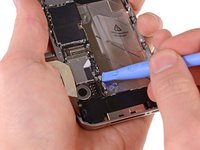
    • Use the edge of a plastic opening tool to pry the dock cable up from its socket on the logic board.

    Ask FixBot

    Add Comment

  3. iPhone 4S Dock Connector Cable Replacement: step 3, image 1 of 1
    • Peel the dock connector cable off the adhesive securing it to the logic board and the side of the speaker enclosure.

    Ask FixBot

    Add Comment

  4. iPhone 4S Dock Connector Cable Replacement: step 4, image 1 of 2 iPhone 4S Dock Connector Cable Replacement: step 4, image 2 of 2
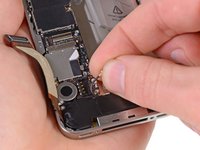
    • Use the edge of a plastic opening tool to pry the cellular antenna cable up from its socket on the logic board.

    • De-route the cellular antenna cable out from under the metal fingers attached to the logic board.

    Ask FixBot

    Add Comment

Conclusion

To reassemble your device, follow these instructions in reverse order.

Cancel: I did not complete this guide.

3 other people completed this guide.

1 Guide Comment

tres belle c'est manifique

nabiljemjami92 - Reply Share

Add Comment

View Statistics:

Past 24 Hours: 1

Past 7 Days: 9

Past 30 Days: 34

All Time: 2,387