
Vtech InnoTab 3S Motherboard Replacement

Karina Garcia and
Last updated on Nov 15, 2026
Views: 1.2K
View statistics:
- Past 24 Hours:
- 3
- Past 7 Days:
- 27
- Past 30 Days:
- 88
- All Time:
- 1,223
Comments: 0
No one has left comments on this guide. Will you be first?
Go to guide commentsCompleted: 3 4
3 people have marked this guide "completed." Will you be next?
4 people have marked this guide "completed." Including you — great job!
Favorites: 0 1
No one has favorited (and subscribed to) this guide. Will you be the first?
1 person has favorited (and subscribed to) this guide — and that's you!
Student In Progress
This guide is being worked on by hardworking students.
Introduction
Go to step 1 ↓Use this guide if your Vtech InnoTab 3s doesn’t function properly or turn on. This guide provides information to carefully remove the device’s motherboard.
The motherboard functions as the device’s “brain.” The motherboard controls all data input and output. If your Vtech InnoTab 3s’ motherboard dies, you can replace it with minimal technical knowledge in a cost-efficient way.
Before disassembly, power off your device. Working with a powered-on device can further damage its motherboard.
What you need
Tools


-
-
-
While holding the battery compartment locks down, slide the two battery doors outwards from the sides of the device.
-
Remove the batteries from the device.
 Ask FixBot
-
-
-
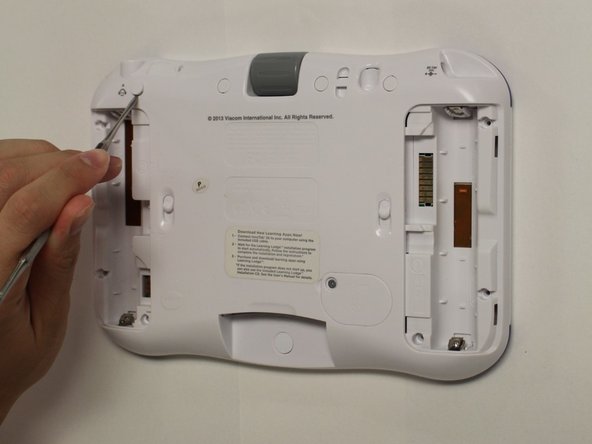
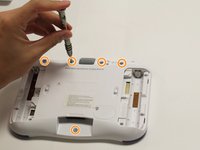
Using a nylon spudger, remove the five caps that hide the screws.
-
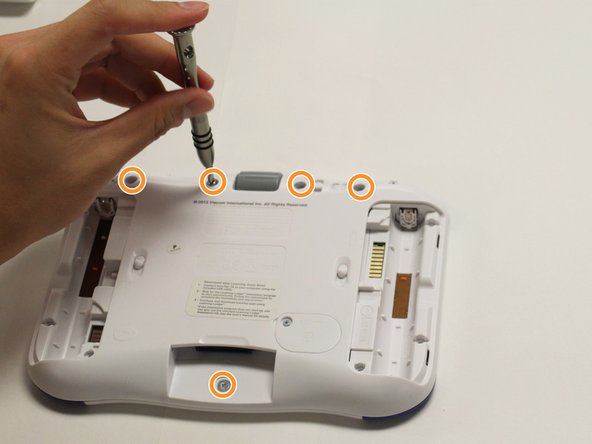
Remove the five 5 mm Phillips #1 screws from the rear panel of the device.
-
-
-
Remove the six 7 mm screws from the battery compartment interior using a Phillips #1 screwdriver.
-
-
-
-
-
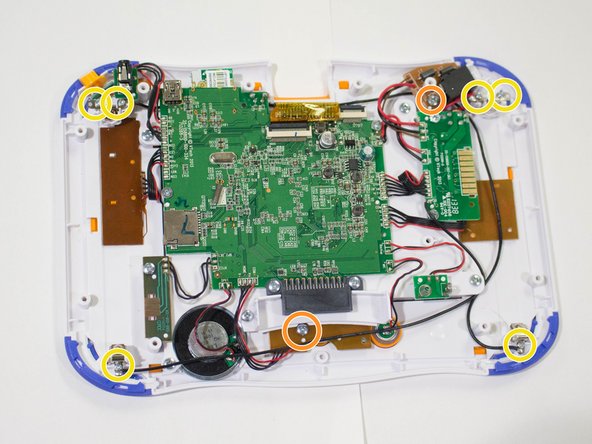
Remove the six screws that secure the motherboard to the front panel of the device using a Phillips #1 screwdriver.
-
Next, remove the two 5mm screws that secure the charger port (upper right and bottom center).
-
Then, remove the six 3 mm screws securing the battery clip.
-
-
Tool used on this step:Tweezers$4.99
-
Using the tweezers, remove the battery clips from each corner (four total) of the Vtech InnoTab 3s.
-
With the tweezers, detached the charging port, headphone port, and the light switch button from the front panel of the device.
-
-





To reassemble your device, follow these instructions in reverse order.
Cancel: I did not complete this guide.
3 other people completed this guide.

Team

USF Tampa, Team 8-2, Eyestone Fall 2015 Member of USF Tampa, Team 8-2, Eyestone Fall 2015
USFT-EYESTONE-F15S8G2
4 Members
108 Guides authored
