
Kindle Voyage Wifi Antenna Replacement

Sean Yap and 8 other contributors
Last updated on May 7, 2024
Views: 2.8K
View statistics:
- Past 24 Hours:
- 3
- Past 7 Days:
- 20
- Past 30 Days:
- 99
- All Time:
- 2,817
Comments: 18
17 comments on steps, 1 guide comment.
Go to guide commentsCompleted: 0 1
No one has marked this guide "completed." Will you be the first?
1 person has marked this guide "completed." It's you — great job!
Favorites: 1 2
1 person has favorited (and subscribed to) this guide. Will you be next?
2 people have favorited (and subscribed to) this guide — including you!
Introduction
Go to step 1 ↓If you are unable to connect to the internet with your Voyage there is likely a problem with your WiFi antenna. This guide is here to help you locate and remove it.
What you need
Tools


-
-
-
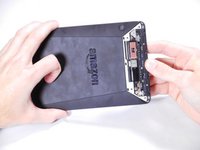
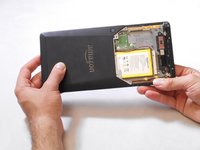
Insert a plastic opening tool between the plastic panel shown on the device.
-
Use the tool to pry the plastic away from the device.
 Ask FixBot
-
-
-
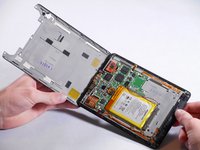
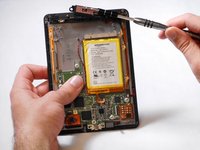
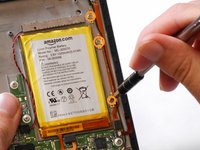
Use an aluminum driver attached with a Phillips head size #00 to remove the four 3mm screws shown in the picture. For reassembly, note that the top two and bottom two screws are different sizes.
-
-
-
-
-
-
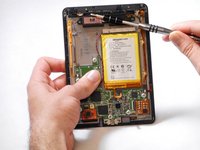
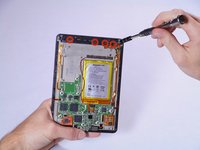
Use an aluminum driver with Phillips head #00 to remove the four 3 mm screws shown in the picture.
-
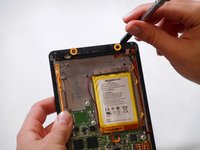
Use the same driver to remove the two 2.5 mm screws.
-
-
Tool used on this step:Tweezers$4.99
-
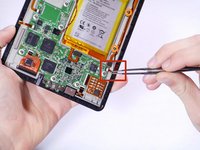
Using the tweezers, undo the attached clip.
-
Remove the three 3 mm screws holding down the rest of the antenna with an aluminum driver and the Phillips #00 head.
-
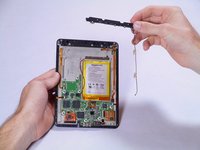
You should now be able to simply take the WiFi bar off of the device.
-
-








To reassemble your device, follow these instructions in reverse order.

Team

Cal Poly, Team 19-12, Maness Winter 2015 Member of Cal Poly, Team 19-12, Maness Winter 2015
CPSU-MANESS-W15S19G12
5 Members
72 Guides authored
1 Guide Comment
Re Kindle Voyage Wifi Antenna Replacement guide: I cannot find the WiFi antenna bar on your website to purchase a replacement. Do you sell it?
