
VTech Kidizoom Camera Connect Shutter Button Replacement

Justin Sanchez and 2 other contributors
Last updated on May 18, 2016
Views: 1.9K
View statistics:
- Past 24 Hours:
- 4
- Past 7 Days:
- 24
- Past 30 Days:
- 104
- All Time:
- 1,872
Comments: 0
No one has left comments on this guide. Will you be first?
Go to guide commentsCompleted: 1 2
1 person has marked this guide "completed." Will you be next?
2 people have marked this guide "completed." Including you — great job!
Favorites: 0 1
No one has favorited (and subscribed to) this guide. Will you be the first?
1 person has favorited (and subscribed to) this guide — and that's you!
Introduction
Go to step 1 ↓Use this guide to remove and replace the button and circuit board used for taking photos
What you need
Tools


-
-
-
Locate the four plastic screw covers denoted by the markers and gently pry them up with the metal spudger.
 Ask FixBot
-
-
-
Remove the two battery cartridges located on the underside of the camera.
-
Once cartridges are removed, use the metal spudger to pry open the top, bottom, and both sides of the camera.
-
-
-
The device should now be open and ready for further repair and/or replacement parts.
-
-
-
-
-
Remove the purple plastic that covers the button and circuit board. It should slide right out from the slot it sits in.
-
-
-
-
Unsolder wires connected to the right side of the circuit board. Pull the wires to the side.
-
-
-
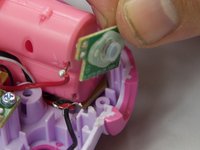
The button/circuit board should be loose now. Gently pull out the button/circuit board to remove it from the device.
-
-



To reassemble your device, follow these instructions in reverse order.
Cancel: I did not complete this guide.
One other person completed this guide.

Team

USF Tampa, Team 6-4, Eyestone Spring 2016 Member of USF Tampa, Team 6-4, Eyestone Spring 2016
USFT-EYESTONE-S16S6G4
4 Members
60 Guides authored
