
VTech CS6719-2 Speaker Replacement

Benjamin Field and 6 other contributors
Last updated on May 7, 2024
Views: 1.5K
View statistics:
- Past 24 Hours:
- 3
- Past 7 Days:
- 18
- Past 30 Days:
- 90
- All Time:
- 1,503
Comments: 2
2 guide comments.
Go to guide commentsCompleted: 0 1
No one has marked this guide "completed." Will you be the first?
1 person has marked this guide "completed." It's you — great job!
Favorites: 1 2
1 person has favorited (and subscribed to) this guide. Will you be next?
2 people have favorited (and subscribed to) this guide — including you!
Step Trimmer
This guide has unnecessary steps. Trim them to be more concise!
Introduction
Go to step 1 ↓During this guide, the back of the phone will need to be taken off to access the speaker and wires. You will need to use the tweezers to remove the metal “U” shaped clip holding the speaker to the back cover.
What you need
Tools


-
-
-
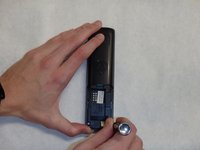
Push down on the battery cover in the direction of the arrow located on the back of the phone.
 Ask FixBot
-
-
-
-
-
-
Remove the two 9mm screws on the back side with a Phillips #0 screwdriver.
-
-
-
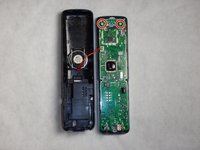
Use the plastic opening tool and spudger to pry the back side of the phone off.
-
-
-
-
Tool used on this step:Tweezers$4.99
-
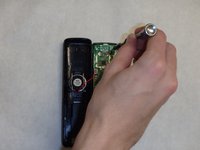
Locate the metal shaped U clip holding the speaker on. Pull up and towards the top of the phone with the flat head tweezers.
-
-
-
Heat up solder joint on the circuit board where the speaker wires are connected.
-
-
-
Refer to How To Solder and Desolder Connections How To Solder and Desolder Connections
-
-







To reassemble your device, follow these instructions in reverse order.

Team

IUPUI, Team 1-4, Baechle Spring 2016 Member of IUPUI, Team 1-4, Baechle Spring 2016
IUPUI-BAECHLE-S16S1G4
4 Members
96 Guides authored
2 Guide Comments
Where can I buy the speaker for the phone?
