15% Off Selected iFixit Tools — Limited Time
Free Shipping on Domestic Orders $75+

VTech Baby's Learning Laptop LEDs Replacement

What you need

  1. VTech Baby's Learning Laptop LEDs Replacement, LEDs: step 1, image 1 of 1
    • To remove the battery door, loosen the screw shown using a Phillips #2 screwdriver.

    • A coin can also be used to loosen the screw.

    Ask FixBot

    Add Comment

  2. VTech Baby's Learning Laptop LEDs Replacement: step 2, image 1 of 1
    • Remove the battery door.

    • Take out the batteries.

    Ask FixBot

    Add Comment

  3. VTech Baby's Learning Laptop LEDs Replacement: step 3, image 1 of 2 VTech Baby's Learning Laptop LEDs Replacement: step 3, image 2 of 2
    • Using a Phillips #0 screwdriver, unscrew the six 7.3mm screws holding the screen together.

    Ask FixBot

    Add Comment

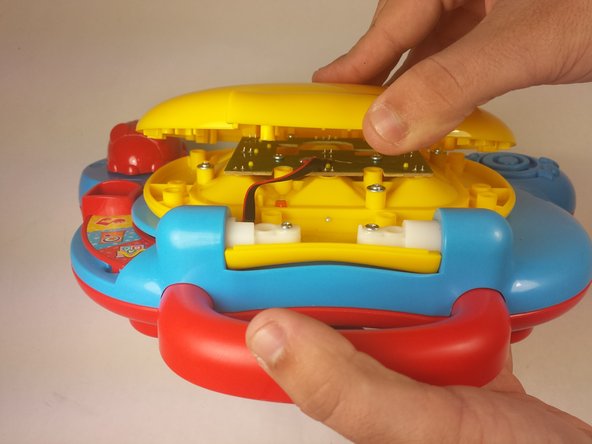
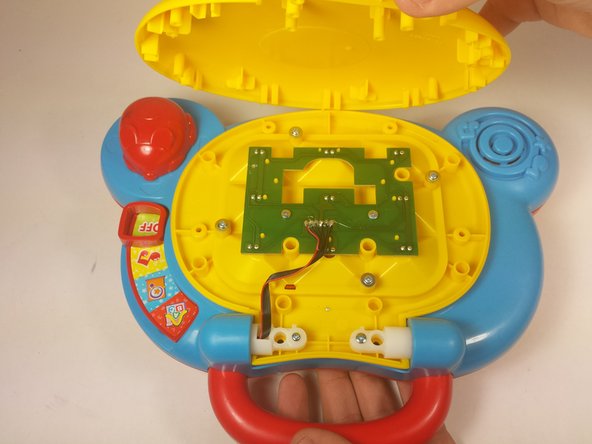
  4. VTech Baby's Learning Laptop LEDs Replacement: step 4, image 1 of 3 VTech Baby's Learning Laptop LEDs Replacement: step 4, image 2 of 3 VTech Baby's Learning Laptop LEDs Replacement: step 4, image 3 of 3
    • With the lid closed, position the device such that the handle is pointing towards you.

    • Using your fingers, gently pry open the cover from the hinge.

    • Attempting to remove the cover while the lid is still open may cause unwanted damage to the device.

    Ask FixBot

    Add Comment

  5. VTech Baby's Learning Laptop LEDs Replacement: step 5, image 1 of 1
    • Remove two 6.0mm screws from the LED array using a Phillips #0 screwdriver.

    Ask FixBot

    Add Comment

  6. VTech Baby's Learning Laptop LEDs Replacement: step 6, image 1 of 1
    • Pickup the array by the opening in the center of the board.

    • Remove the faulty LEDs by desoldering each from the board. You may refer to this soldering guide if necessary.

    • Movement of the array will be limited as it is still attached to the main device board.

    Ask FixBot

    Add Comment

Conclusion

To reassemble your device, follow these instructions in reverse order.

Cancel: I did not complete this guide.

Team

USF Tampa, Team 12-2, Blackwell Fall 2015 Member of USF Tampa, Team 12-2, Blackwell Fall 2015

USFT-BLACKWELL-F15S12G2

4 Members

14 Guides authored

0 Guide Comments

Add Comment

View Statistics:

Past 24 Hours: 0

Past 7 Days: 1

Past 30 Days: 33

All Time: 1,520