Free Shipping on Domestic Orders $75+

Upgrade Storage for the New Nintendo 3DS XL 2015

Views: 27K

View statistics:

Past 24 Hours:
6
Past 7 Days:
46
Past 30 Days:
220
All Time:
26,834
Comments: 4

3 comments on steps, 1 guide comment.

Go to guide comments
Completed: 16

16 people have marked this guide "completed." Will you be next?

Favorites: 2

2 people have favorited (and subscribed to) this guide. Will you be next?

Time Required: 5 - 10 minutes
Difficulty: Easy
Upgrade Storage for the New Nintendo 3DS XL 2015

Introduction

Go to step 1 ↓

If your NEW Nintendo 3DS XL (Model: RED-001) is limiting your gaming experience due to the restricted factory storage, this guide will help you in upgrading the internal storage.

The original storage of the 3DS XL is a 4GB Micro SD card, and the ability to store games and photos causes the memory to fill rather quickly. This feature allows users to minimize the times they need to replace the game cartridges every time they wish to play a certain game.

Before using this guide, first verify that a Micro SDHC card is used as a replacement. If any other type of micro SD card is used, the 3DS XL will not recognize the upgrade. Also verify that your SDHC card does not exceed 32GB of storage.

The first crucial step is to power off the 3DS XL. Failure to do this could lead to damage to both you and the device.

Take note that in Step 5, the screws cannot be fully removed. A clicking noise will be heard when the screw has been loosened enough for disassembly. Lastly, when inserting the new SDHC verify that the label is facing you. Caution: If any resistance is felt when inserting the new card, do not force the card into the slot.

The repair will be a success when the upgraded storage is seen in the settings of the device.

What you need

Tools

    1. Upgrade Storage for the New Nintendo 3DS XL 2015, Upgrade Storage for the New Nintendo 3DS XL 2015: step 1, image 1 of 1
      • Make sure your device is powered off before advancing to the next step. Failure to do this could result in electrical shock or damage to the device.

      • Power off the device by locating the circular power button and pressing Power Off on the screen.

      Ask FixBot

      Add Comment

    2. Upgrade Storage for the New Nintendo 3DS XL 2015: step 2, image 1 of 2 Upgrade Storage for the New Nintendo 3DS XL 2015: step 2, image 2 of 2
      • Turn the Nintendo 3DS around, so that you are looking at the back of the device.

      • Remove the stylus from the device.

      • Failure to remove the stylus can result in damage to the stylus and internal damage to the device.

      Ask FixBot

      Add Comment

    3. Upgrade Storage for the New Nintendo 3DS XL 2015: step 3, image 1 of 2 Upgrade Storage for the New Nintendo 3DS XL 2015: step 3, image 2 of 2
      • Remove the game cartridge by pulling it out of its slot.

      • Failure to remove the game cartridge may result in permanent damage to the game.

      Ask FixBot

      Add Comment

    4. Upgrade Storage for the New Nintendo 3DS XL 2015: step 4, image 1 of 2 Upgrade Storage for the New Nintendo 3DS XL 2015: step 4, image 2 of 2
      • Loosen the two screws using a Phillips #0 screwdriver.

      • The screws will not completely come out of the backplate. When a clicking sound is heard, the screws will be loose.

      Ask FixBot

      Add Comment

    5. Upgrade Storage for the New Nintendo 3DS XL 2015: step 5, image 1 of 3 Upgrade Storage for the New Nintendo 3DS XL 2015: step 5, image 2 of 3 Upgrade Storage for the New Nintendo 3DS XL 2015: step 5, image 3 of 3
      • Wedge the system's stylus or an opening pick in the cutout to separate the back plate from the device.

      Ask FixBot

      Add Comment

    6. Upgrade Storage for the New Nintendo 3DS XL 2015: step 6, image 1 of 2 Upgrade Storage for the New Nintendo 3DS XL 2015: step 6, image 2 of 2
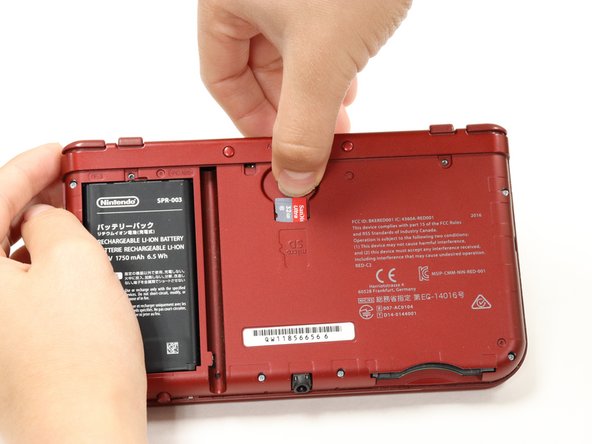
      • Remove the factory-placed micro SD card from the designated slot by pressing down onto the card.

      • The spring will then pop the card upwards.

      • Slide the card out to fully remove it from the 3DS.

      Ask FixBot

      Add Comment

    7. Upgrade Storage for the New Nintendo 3DS XL 2015: step 7, image 1 of 3 Upgrade Storage for the New Nintendo 3DS XL 2015: step 7, image 2 of 3 Upgrade Storage for the New Nintendo 3DS XL 2015: step 7, image 3 of 3
      • A micro SDHC Memory Card must be used when upgrading the 3DS XL memory from standard 4gb. The maximum upgradable memory is 32gb.

      • Align the new micro SDHC card with the card slot.

      • Verify that the label/ front side of the micro SDHC card is facing towards you when performing these steps.

      • Press downwards on the card until you hear a click. This will verify that the card is properly inserted.

      • After reassembly, check the settings to verify that the storage has been upgraded.

      Ask FixBot

      Add Comment

Conclusion

To reassemble your device, follow these instructions in reverse order.

Cancel: I did not complete this guide.

16 other people completed this guide.

Maysa Rizk

Member since: 09/30/19

295 Reputation

1 Guide authored

Team

CSU Fullerton, Team S1-G4, Bruce Fall 2019 Member of CSU Fullerton, Team S1-G4, Bruce Fall 2019

CSUF-BRUCE-F19S1G4

4 Members

12 Guides authored

1 Guide Comment

Note that a card larger than 32GB can work, but it needs to be formatted externally into FAT32, and it will slow down boot time of the console startup and game startup slightly too.

mjesticfalco - Reply Share

Add Comment

View Statistics:

Past 24 Hours: 6

Past 7 Days: 46

Past 30 Days: 220

All Time: 26,834