
Unnecto Drone M Disassembly

Esteban Almeida and
Last updated on May 7, 2024
Views: 237
View statistics:
- Past 24 Hours:
- 0
- Past 7 Days:
- 7
- Past 30 Days:
- 12
- All Time:
- 237
Comments: 0
No one has left comments on this guide. Will you be first?
Go to guide commentsCompleted: 0 1
No one has marked this guide "completed." Will you be the first?
1 person has marked this guide "completed." It's you — great job!
Favorites: 0 1
No one has favorited (and subscribed to) this guide. Will you be the first?
1 person has favorited (and subscribed to) this guide — and that's you!
Prerequisite Only
This is a prerequisite-only guide! This guide is part of another procedure and isn’t meant to be used alone.
Action Shots
Be an action hero! This guide needs images that better demonstrate how to perform specific actions.
Confusing Text
Some of this guide's text is confusing, duplicated, or off-topic. Clarify it by editing!
Needs Better Images
Better photos will improve this guide. Help out by taking, editing, or uploading new ones!
Introduction
Go to step 1 ↓This guide will show you how to carefully disassemble the Unnecto Drone M with easily available tools.
What you need
Tools


-
-
-
Place the phone facedown on a cleared work area
-
Remove the back case by applying moderate force to the indentation in the lower left corner of the case.
 Ask FixBot
-
-
-
Grip the top right corner of the battery.
-
Remove the battery by pulling it outwards.
-
-
-
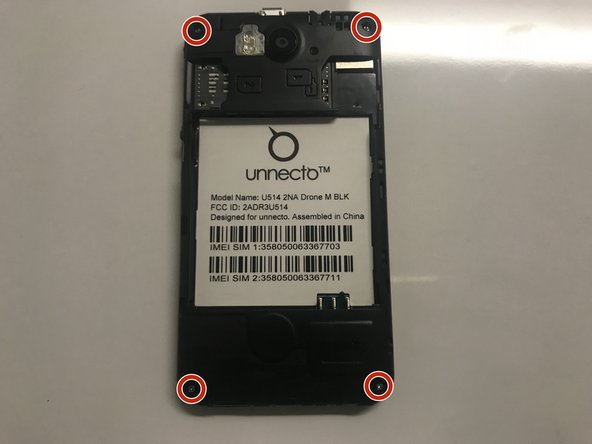
Remove the four screws on the back of the phone using a Philips 000 screwdriver
-
-
-
-
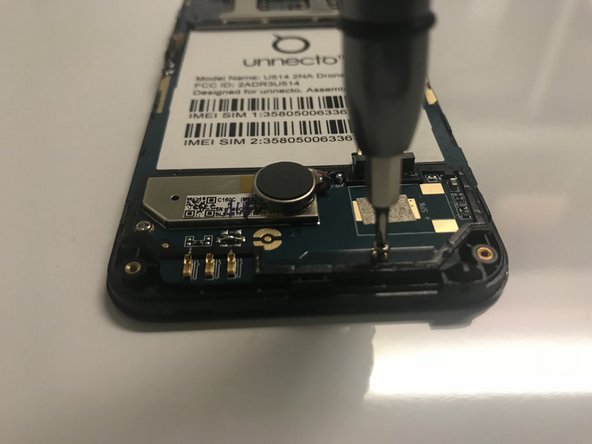
Use a Phillips #000 screwdriver to remove the four screws that secure the motherboard.
-
-
Tool used on this step:Tweezers$4.99
-
Disconnect the ribbon cable from the motherboard using rounded, spade-tipped tweezers.
-
-
-
Peel the white circuit on left side of the frame by inserting fine-tipped tweezers between it and the frame.
-
-






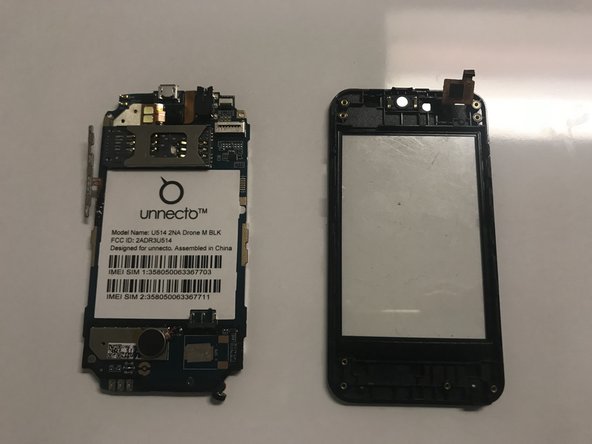
To reassemble your device, follow these instructions in reverse order.

Team

University of North Texas, Team S6-G4, Thomas Spring 2018 Member of University of North Texas, Team S6-G4, Thomas Spring 2018
UNT-THOMAS-S18S6G4
4 Members
60 Guides authored
