
Uniden Guardian G955 Battery Replacement

Sundus Al Shibani and 5 other contributors
Last updated on May 23, 2024
Views: 6.8K
View statistics:
- Past 24 Hours:
- 2
- Past 7 Days:
- 20
- Past 30 Days:
- 84
- All Time:
- 6,775
Comments: 6
1 comment on steps, 5 guide comments.
Go to guide commentsCompleted: 1 2
1 person has marked this guide "completed." Will you be next?
2 people have marked this guide "completed." Including you — great job!
Favorites: 0 1
No one has favorited (and subscribed to) this guide. Will you be the first?
1 person has favorited (and subscribed to) this guide — and that's you!
Incorrect Tools
Help make this guide better by using the correct tools in images and/or text.
Introduction
Go to step 1 ↓If your Uniden Guardian G955 has lost its ability to hold or maintain a charge despite charging with the given adapter, you have a dysfunctional battery that needs to be replaced.
A working battery is necessary in order for your Uniden Guardian G955 monitor to turn on and display images and recordings captured by the surveillance system. If you have noticed that your monitor is not charging or holding a charge despite using the given adapter and trying other power outlets consider giving your monitor a reset.
If upon a reset your monitor still doesn’t hold a charge or turn on, you have a faulty battery that needs to be replaced.
Make sure your device is completely powered down and unplugged before you begin.
What you need
Tools
-
Spudger4.9
-


-
-
-
First, remove four 6.1 mm screws from your monitor using a J1 Phillips head screwdriver.
 Ask FixBot
-
-
-
Carefully, use a metal spudger to open the case starting from any corner.
-
Slowly slide the spudger along the inside edge of the case.
-
-
-
-
Remove the two 6.1 mm screws from the black fastener using a screwdriver.
-
Remove the black fastener.
-
-
-
Disconnect the head of the cable attached to the motherboard by pressing on the outer edge of the cable and sliding it out.
-
-
Tool used on this step:Halberd Spudger$2.99
-
Remove the battery from the case by sliding a halberd spudger below it. (note: the spudger shown is metal, to ensure proper safety, utilize a nylon or plastic spudger.)
-
-


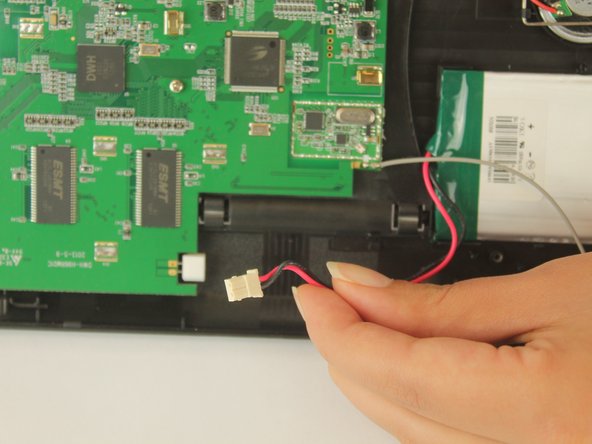


To reassemble your device, follow these instructions in reverse order.
Cancel: I did not complete this guide.
One other person completed this guide.

Team

USF Tampa, Team 1-1, Nance Fall 2016 Member of USF Tampa, Team 1-1, Nance Fall 2016
USFT-NANCE-F16S1G1
3 Members
48 Guides authored
5 Guide Comments
The instructions and illustrations are fine, but there is NO information on how to obtain a replacement battery. I have searched without any luck.
I’m going to try using this battery: YK843553-Battery-for-UNIDEN-UBW2101C-Camera-UBWC21-1250mAh
I think it will work. The connector and voltage are the same.
No reception at a distance away from home
