Free Shipping on Domestic Orders $75+

Unfasten Battery

Prerequisite Only
This is a prerequisite-only guide! This guide is part of another procedure and isn’t meant to be used alone.

What you need

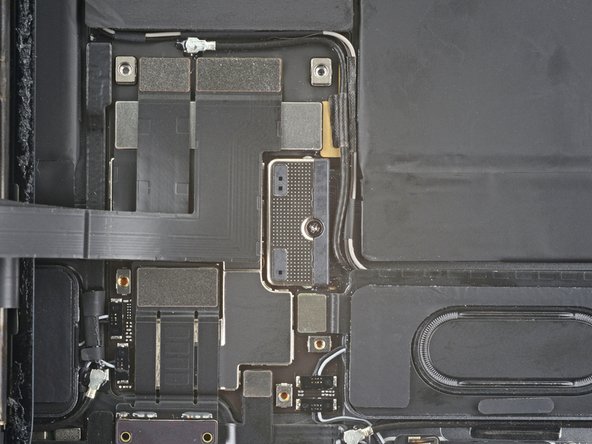
  1. Unfasten Battery, Unfasten the lower cable shield: step 1, image 1 of 2 Unfasten Battery, Unfasten the lower cable shield: step 1, image 2 of 2
    • Use a Phillips screwdriver to remove the five screws securing the lower cable shield to the logic board:

    • Two 2.0 mm screws

    • Three 1.3 mm screws

  2. Unfasten Battery, Remove the lower cable shield: step 2, image 1 of 1
    Tool used on this step:
    Tweezers
    $4.99
    Buy
    • Use tweezers or your fingers to grab and remove the lower cable shield.

  3. Unfasten Battery, Unfasten the battery connector: step 3, image 1 of 2 Unfasten Battery, Unfasten the battery connector: step 3, image 2 of 2
    • Use a Phillips screwdriver to remove the 1.8 mm screw securing the battery connector to the logic board.

Conclusion

To reassemble your device, follow these instructions in reverse order.

Chayton Ritter

Member since: 08/21/20

25,898 Reputation

105 Guides authored

Team

Guide Team Member of Guide Team

Staff

10 Members

16,366 Guides authored

0 Guide Comments

Add Comment

View Statistics:

Past 24 Hours: 0

Past 7 Days: 2

Past 30 Days: 4

All Time: 55