Introduction
This guide will demonstrate how to replace the back plate on your Turtle Beach Recon.
The back plate supports the inside components of your Turtle Beach Recon such as the motherboard. It is often necessary to remove or replace the back plate should it appear to be broken or exposed to water.
What you need
-
-
-
Use a Phillips #00 screwdriver to remove seven 10 mm screws from the back plate.
 Ask FixBot
-
-
-
-
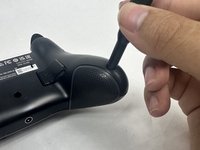
Use an opening tool to separate the back plate from the grips of your Turtle Beach Recon.
-
Use your fingers to remove the back plate from the body of your Turtle Beach Recon.
-
-




To reassemble your device, follow these instructions in reverse order.
Cancel: I did not complete this guide.
3 other people completed this guide.

Team

UMass Dartmouth, Team 6-1, Botvin Spring 2024 Member of UMass Dartmouth, Team 6-1, Botvin Spring 2024
UMASSD-BOTVIN-S24S6G1
3 Members
60 Guides authored
