Free Shipping on Domestic Orders $75+

Troubleshooting VONIX PHONE

    1. Troubleshooting VONIX PHONE, Troubleshooting VONIX PHONE: step 1, image 1 of 1
      • Vonix No login button.

      Ask FixBot

      Add Comment

    2. Troubleshooting VONIX PHONE: step 2, image 1 of 1
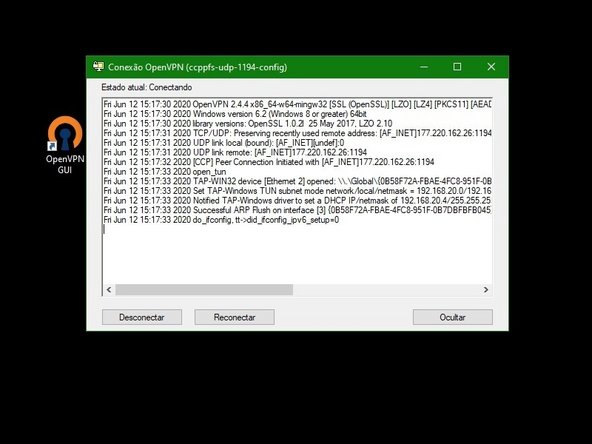
      • Make sure the VPN is connected and has no red lines in the log.

      Ask FixBot

      Add Comment

    3. Troubleshooting VONIX PHONE: step 3, image 1 of 1
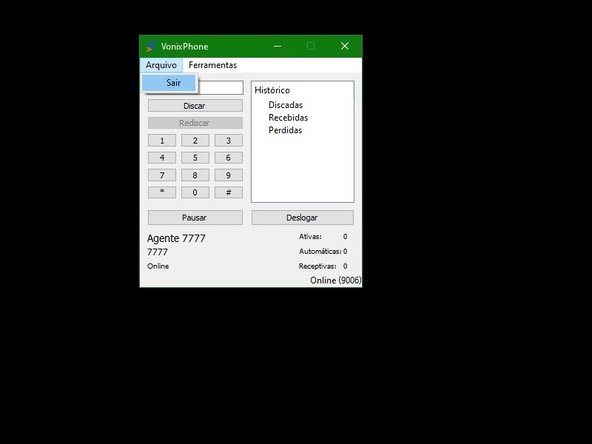
      • Select FILE > EXIT

      • It will not work if you use the Close option using the X in the right corner.

      Ask FixBot

      Add Comment

    4. Troubleshooting VONIX PHONE: step 4, image 1 of 1
      • VONIX LOGGED BUT NO SOUND

      Ask FixBot

      Add Comment

    5. Troubleshooting VONIX PHONE: step 5, image 1 of 1
      • Make sure the VPN is connected and has no red lines in the log.

      Ask FixBot

      Add Comment

    6. Troubleshooting VONIX PHONE: step 6, image 1 of 1
      • Click FILE > EXIT

      • It will not work if you use the option Close with the X in the right corner.

      Ask FixBot

      Add Comment

Conclusion

To reassemble your device, follow these instructions in reverse order.

Cancel: I did not complete this guide.

Special thanks to these translators:

pt en

100%

These translators are helping us fix the world! Want to contribute?
Start translating ›

Suporte CCP

Member since: 06/12/20

133 Reputation

1 Guide authored

0 Guide Comments

Add Comment

View Statistics:

Past 24 Hours: 1

Past 7 Days: 19

Past 30 Days: 44

All Time: 534