
Tribit XSound Go TS-BTS20 Passive Radiator Replacement

Hasini Kanuru and
Last updated on Dec 29, 2023
Views: 884
View statistics:
- Past 24 Hours:
- 3
- Past 7 Days:
- 13
- Past 30 Days:
- 71
- All Time:
- 884
Comments: 0
No one has left comments on this guide. Will you be first?
Go to guide commentsCompleted: 1 2
1 person has marked this guide "completed." Will you be next?
2 people have marked this guide "completed." Including you — great job!
Favorites: 0 1
No one has favorited (and subscribed to) this guide. Will you be the first?
1 person has favorited (and subscribed to) this guide — and that's you!
Introduction
Go to step 1 ↓The Tribit XSound Go bluetooth speaker delivers rich, clear, room-filling sound like you've never heard before. Amazing full-range drivers, passive radiators create an auditory experience that's a delight for the senses.
What you need


-
-
-
Insert a spudger in the seam between the front speaker grill and chassis.
-
Pry around the perimeter until the front grill releases.
-
Remove the front grill.
 Ask FixBot
-
-
-
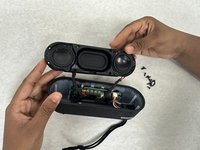
Unscrew all the screws with the Phillips screwdriver, on the opened panel.
-
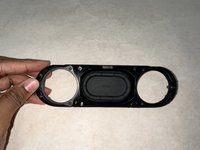
Lift off the speaker housing.
-
-
-




To reassemble your device, follow these instructions in reverse order.
Cancel: I did not complete this guide.
One other person completed this guide.
Team

University of North Texas, Team 3-3, Coppersmith Fall 2023 Member of University of North Texas, Team 3-3, Coppersmith Fall 2023
UNT-COPPERSMITH-F23S3G3
4 Members
36 Guides authored
