Introduction
The screen on the TomTom ONE is likely to get scratched and/or shatter as a result of wear and tear. This guide will walk you step by step on your way to replacing it.
What you need
-
-
-
Use a T-9 Torx screwdriver to unscrew the four screws on the back cover.
 Ask FixBot
-
-
-
Using the spudger, gently pry apart the back case from the front case. It is easier to start on a side and work your way around the device.
-
-
-
Tool used on this step:Tweezers$4.99
-
Once the two covers are separated, use the tweezers, or even your fingers, to gently disconnect the two sets of wires that are connected to the motherboard from the back cover. You may have to wiggle the wires a little bit to get them to disconnect.
-
-
-
Next, you must remove the motherboard from the front screen.
-
Use a Torx T-7 screwdriver to unscrew the two screws.
-
-
-
Before you can seperate the motherboard from the front cover, you must disconnect the wire connecting the two.
-
To do so, you must use the back end of the spudger to push out the two white tabs connected to the wire, that holds the motherboard and front cover together.
-
-
-
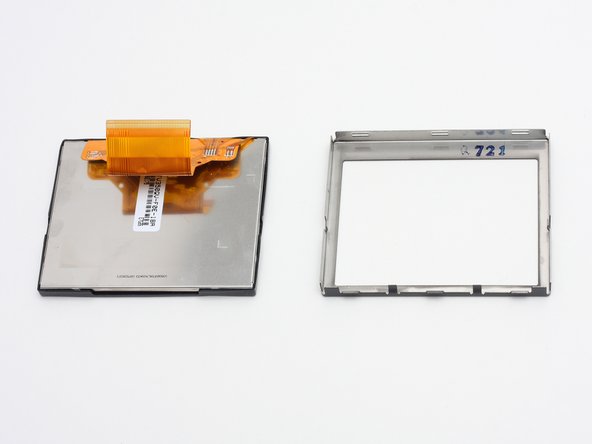
Apply pressure with thumbs to remove screen from inner casing.
-
The screen and front cover are now disconnected.
-
-




Cancel: I did not complete this guide.
2 other people completed this guide.

Team

Cal Poly, Team 7-7, Maness Spring 2010 Member of Cal Poly, Team 7-7, Maness Spring 2010
CPSU-MANESS-S10S7G7
4 Members
42 Guides authored
