
Tolino Vision Battery Replacement

Micha and 5 other contributors
Last updated on Apr 3, 2025
Views: 23K
View statistics:
- Past 24 Hours:
- 18
- Past 7 Days:
- 138
- Past 30 Days:
- 548
- All Time:
- 23,443
Comments: 11
6 comments on steps, 5 guide comments.
Go to guide commentsCompleted: 7 8
7 people have marked this guide "completed." Will you be next?
8 people have marked this guide "completed." Including you — great job!
Favorites: 2 3
2 people have favorited (and subscribed to) this guide. Will you be next?
3 people have favorited (and subscribed to) this guide — including you!
Community-Contributed Guide
An awesome member of our community made this guide. It was not created by iFixit staff.
Introduction
Go to step 1 ↓Here is the corrected text:
My Tolino E-Book Reader's battery was so discharged after about a year of non-use that it had to be replaced with a new one.
A type PR-285083 battery (3.7V /1500mAh) is needed. The price is about 14€.
-
-
-
First, open the edge of the Tolino with a spudger or pick. The lid is only clipped and can be opened easily.
 Ask FixBot
-
-
-
Update: The cable (and the ribbon cables) are secured with a bit of silicone. This can be removed quite easily, like a sticker.
-
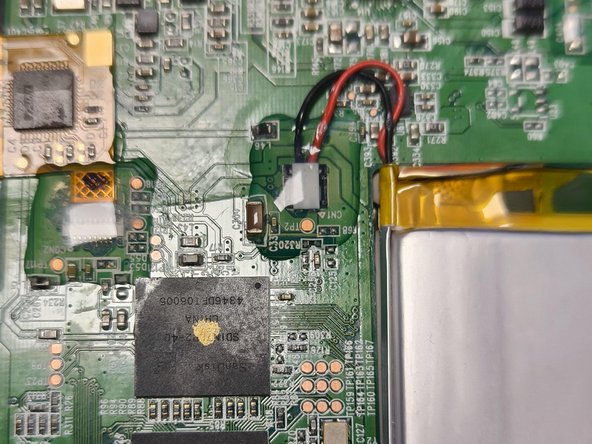
Now disconnect the battery cable. Carefully pry it off from underneath.
-
-
-
-
The battery is secured in the middle with fairly strong tape. Carefully slide a spudger underneath and loosen it.
-
-






Work through the steps in reverse order to reassemble your device.
Cancel: I did not complete this guide.
7 other people completed this guide.
Special thanks to these translators:
100%


These translators are helping us fix the world! Want to contribute?
Start translating ›

5 Guide Comments
sehr einfach. danke
Sehr gut, danke!
Bei meinem Tolino war der Bildschirmrahmen innen mit einem Kunststoffrahmen verklebt, der unten an der Platine angenietet ist. Dadurch konnte der Bildschirmrahmen nicht ohne weiteres vom Gehäuseboden getrennt werden. Die Verklebung war ziemlich hartnäckig. Leider ist beim Lösen der Verklebung der Bildschirmrahmen an verschiedenen Stellen gebrochen. Zudem war die Platine mit 4 Schrauben am Gehäuseboden festgeschraubt. Erst danach bin ich an den Akku gekommen.
War nicht ganz so problemlos wie beschrieben, aber ohne diesen Input wäre ich gar nicht auf die Idee gekommen, den Tolino zu öffnen (lag schon im Elektroschrott....). Jetzt bekommt er ein zweites Leben ;-)
