Free Shipping on Domestic Orders $75+

Thrustmaster T3PM Maintenance

What you need

  1. Thrustmaster T3PM Maintenance, Disconnect the pedal heads: step 1, image 1 of 2 Thrustmaster T3PM Maintenance, Disconnect the pedal heads: step 1, image 2 of 2
    • Unscrew all 6 screws from the pedal heads

    • Note the positioning of the pedal heads or take this opportunity to try out new position

    • Before starting, unplug your T3PM.

    Ask FixBot

    Add Comment

  2. Thrustmaster T3PM Maintenance, Remove screws from the bottom: step 2, image 1 of 1
    • Using Phillips screwdriver remove all screws at the bottom.

    Ask FixBot

    Add Comment

  3. Thrustmaster T3PM Maintenance, Remove the top cover: step 3, image 1 of 1
    • Remove the top cover and put it aside

    Ask FixBot

    Add Comment

    • Clean off any dust, residue, pet hair and other foreign debris that has accumulated inside the pedal set.

    Ask FixBot

    Add Comment

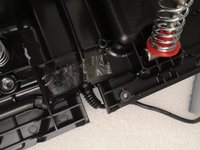
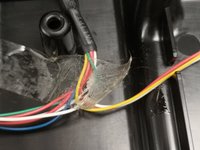
  4. Thrustmaster T3PM Maintenance, Inspect the wires and tape.: step 5, image 1 of 2 Thrustmaster T3PM Maintenance, Inspect the wires and tape.: step 5, image 2 of 2
    • Make sure that the wires and the main cable are secure.

    • Replace sticky tape if necessary.

    Ask FixBot

    Add Comment

  5. Thrustmaster T3PM Maintenance, Thoroughly clean each pedal.: step 6, image 1 of 1
    • Clean off any dust, residue, pet hair etc from the pedals themselves, near the sensors and springs.

    • Make sure to clean off the extremities of the pedals.

    Ask FixBot

    Add Comment

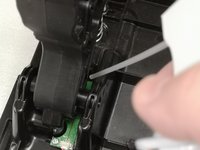
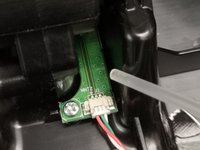
  6. Thrustmaster T3PM Maintenance, Clean the sensors: step 7, image 1 of 2 Thrustmaster T3PM Maintenance, Clean the sensors: step 7, image 2 of 2
    • Using an air-blower, compressed air-can or other tool, clean the sensors.

    • Be cautions as to not damage the sensors, wires or the connectors.

    • Watch out for Electro-static Discharge. Make sure not to touch the sensors or use anti-static wrist strap.

    Ask FixBot

    Add Comment

  7. Thrustmaster T3PM Maintenance, Inspect the springs.: step 8, image 1 of 1
    • Inspect the conditions of the gas and clutch springs.

    • Re-lubricate if necessary.

    Ask FixBot

    Add Comment

Conclusion

To reassemble your device, follow the steps 1,2,3 in reverse order.

Cancel: I did not complete this guide.

Formica Fusca

Member since: 08/01/24

2,600 Reputation

15 Guides authored

0 Guide Comments

Add Comment

View Statistics:

Past 24 Hours: 2

Past 7 Days: 14

Past 30 Days: 99

All Time: 1,562