
Texas Instruments TI BA II PLUS Battery Replacement

Peipei Yu and one other contributor
Last updated on Jun 2, 2021
Views: 33K
View statistics:
- Past 24 Hours:
- 10
- Past 7 Days:
- 53
- Past 30 Days:
- 315
- All Time:
- 32,875
Comments: 4
1 comment on steps, 3 guide comments.
Go to guide commentsCompleted: 6 7
6 people have marked this guide "completed." Will you be next?
7 people have marked this guide "completed." Including you — great job!
Favorites: 0 1
No one has favorited (and subscribed to) this guide. Will you be the first?
1 person has favorited (and subscribed to) this guide — and that's you!
Introduction
Go to step 1 ↓This guide demonstrates quick step-by-step instructions on how to replace the battery on a TI BA II PLUS Calculator.
The TI BA II PLUS Calculator has a special function in financial calculation which other calculators don’t have. For students who major in accounting and finance, using their financial calculator frequently will inevitably run out the batteries more quickly. If students don’t know to to replace the batteries, they may just throw away the used calculator then buy a new one. They would not only waste $40, but the unnecessary consumption of plastic can damage our environment. We all know that plastic pollution causes harm to humans, animals and plants through toxic pollutants.
Knowing how to replace the battery is necessary to maintain your calculator. This guide shows the steps to replace the battery of your TI BA II PLUS Calculator.
What you need


-
-
-
Switch off the calculator by pressing the button at the top right corner.
 Ask FixBot
-
-
-
Turn over the calculator so the backside of the calculator is facing upwards.
-
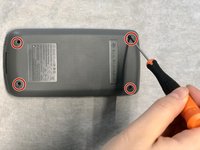
Remove the four 2mm Phillips #00 screws from the bottom cover.
-
-
-
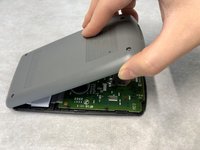
Open a small gap at the bottom of the calculator, using a spudger or your fingers.
-
Move your thumb from the bottom edge to the top.
-
-
-
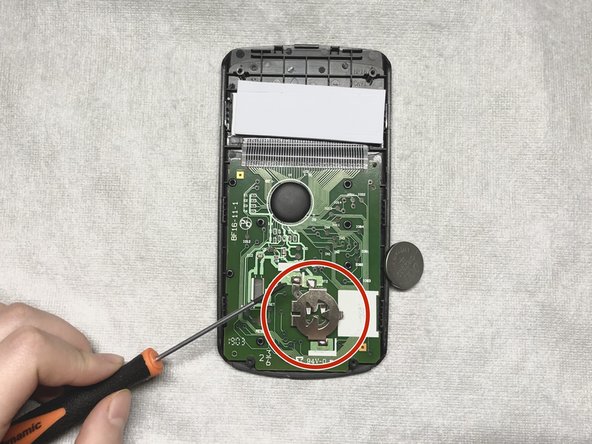
Use a spudger to remove the battery from the cage at the bottom of the motherboard.
-
-
-
-
Reattach the calculator cases, beginning from the top edge.
-
Use the Phillips #00 screwdriver to replace the 2.00 mm screws.
-
-




Cancel: I did not complete this guide.
6 other people completed this guide.

Team

York University, Team S2-G30, O'Regan Winter 2021 Member of York University, Team S2-G30, O'Regan Winter 2021
YORK-O'REGAN-W21S2G30
1 Member
12 Guides authored
