
Tagital T10 Battery Replacement

Cody D'Amato and
Last updated on May 7, 2024
Views: 1.6K
View statistics:
- Past 24 Hours:
- 2
- Past 7 Days:
- 22
- Past 30 Days:
- 93
- All Time:
- 1,590
Comments: 0
No one has left comments on this guide. Will you be first?
Go to guide commentsCompleted: 2 3
2 people have marked this guide "completed." Will you be next?
3 people have marked this guide "completed." Including you — great job!
Favorites: 0 1
No one has favorited (and subscribed to) this guide. Will you be the first?
1 person has favorited (and subscribed to) this guide — and that's you!
Introduction
Go to step 1 ↓Your device is equipped with a single battery that is capable of providing several hours of normal usage. Deterioration over time or using while on the charger can cause the battery life to decrease or even cause the device to be unusable without being on the charger. To fix this, you must replace the battery.
What you need
Tools


-
-
-
Carefully remove the back cover by using a plastic opening tool, moving all the way around the perimeter of the tablet.
-
Set the back cover aside.
-
-
-
-
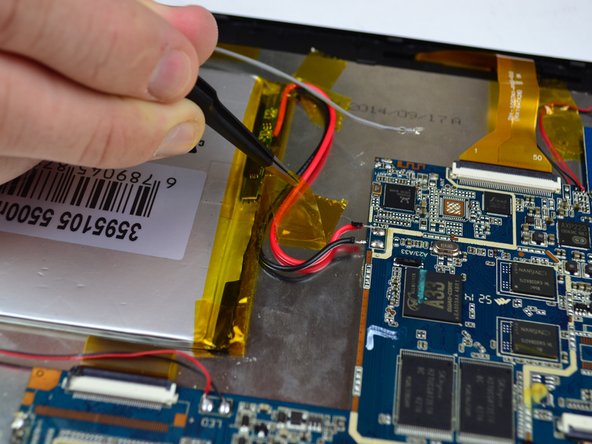
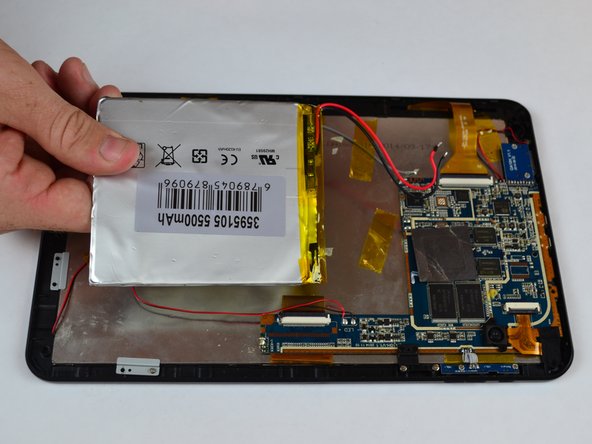
Locate the red and black wires that connect the battery to the motherboard.
-
Carefully peel away the tape that keeps the wires secured to the back of the display screen.
-
-
Tool used on this step:Tweezers$4.99
-
Soften the old solder by heating it with the soldering tool, so that the wires can be removed with tweezers.
-
-
-
Heat up the battery with the iOpener Heat tool in order to soften the adhesive that keeps the battery in place.
-

 Ask FixBot






To reassemble your device, follow these instructions in reverse order.
Cancel: I did not complete this guide.
2 other people completed this guide.

Team

USF Tampa, Team 14-5, Eyestone Fall 2016 Member of USF Tampa, Team 14-5, Eyestone Fall 2016
USFT-EYESTONE-F16S14G5
4 Members
60 Guides authored
