Free Shipping on Domestic Orders $75+

Speaker Duplicate Guide

Archived Guide
This guide is retained solely for historical purposes. Use the updated version of the guide to perform your repair.

What you need

    1. Speaker Duplicate Guide, Speaker: step 1, image 1 of 2 Speaker Duplicate Guide, Speaker: step 1, image 2 of 2
      • Remove grey rubber caps from the four corners of the internal screen.

      • Remove the four 1.3 mm screws, which are directly underneath the grey caps, with a Phillips head screwdriver.

      Ask FixBot

      Add Comment

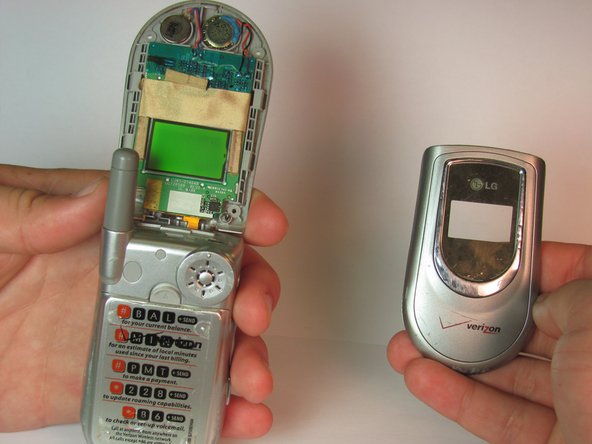
    2. Speaker Duplicate Guide: step 2, image 1 of 3 Speaker Duplicate Guide: step 2, image 2 of 3 Speaker Duplicate Guide: step 2, image 3 of 3
      • Run a pry bar along the seem of the edge of the phone to separate the top screen casing.

      • Work the bar around the edge until the entire top section with the LG logo is removed.

      Ask FixBot

      Add Comment

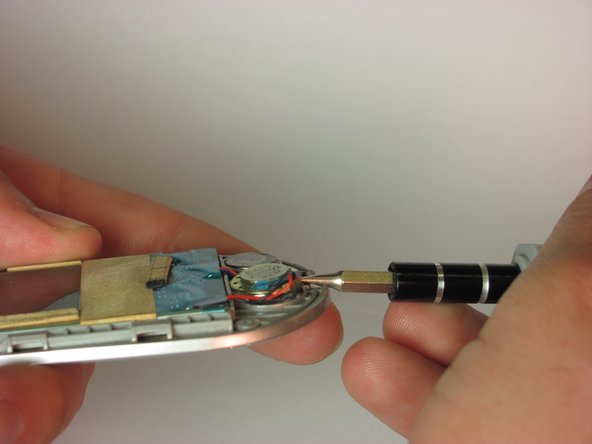
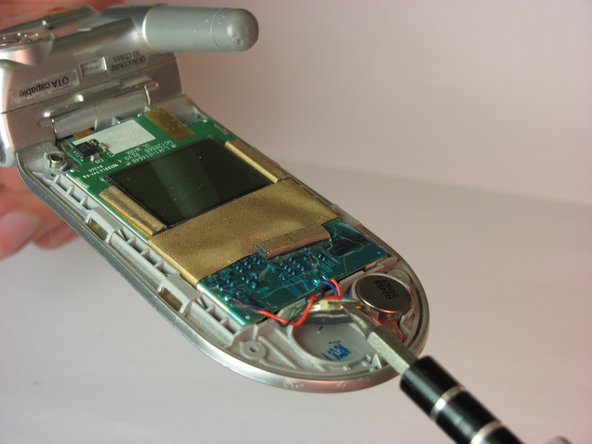
    3. Speaker Duplicate Guide: step 3, image 1 of 3 Speaker Duplicate Guide: step 3, image 2 of 3 Speaker Duplicate Guide: step 3, image 3 of 3
      • With a flathead screwdriver, lift the speaker from the device.

      Ask FixBot

      Add Comment

Conclusion

To reassemble your device, follow these instructions in reverse order.

Cancel: I did not complete this guide.

iDeleted

Member since: 07/07/10

2,101 Reputation

39 Guides authored

0 Guide Comments

Add Comment

View Statistics:

Past 24 Hours: 0

Past 7 Days: 4

Past 30 Days: 9

All Time: 357