Free Shipping on Domestic Orders $75+

Sony Xperia Z5 Compact LCD Screen Assembly Replacement

What you need

Video Overview

  1. Sony Xperia Z5 Compact LCD Screen Assembly Replacement, LCD Screen Assembly: step 1, image 1 of 2 Sony Xperia Z5 Compact LCD Screen Assembly Replacement, LCD Screen Assembly: step 1, image 2 of 2
    • Power off and remove SIM card tray.

    Ask FixBot
  2. Sony Xperia Z5 Compact LCD Screen Assembly Replacement: step 2, image 1 of 3 Sony Xperia Z5 Compact LCD Screen Assembly Replacement: step 2, image 2 of 3 Sony Xperia Z5 Compact LCD Screen Assembly Replacement: step 2, image 3 of 3
    • Heat up the back cover to soften the adhesive.

    • Place the suction cup to open a gap from top side, then insert guitar picks and slide it to cut the adhesive underneath.

    • Remove back cover.

    Ask FixBot
  3. Sony Xperia Z5 Compact LCD Screen Assembly Replacement: step 3, image 1 of 2 Sony Xperia Z5 Compact LCD Screen Assembly Replacement: step 3, image 2 of 2
    • Twist off 10 Phillips screws all.

    • Loosen NFC clip and flashlight clip.

    Ask FixBot
  4. Sony Xperia Z5 Compact LCD Screen Assembly Replacement: step 4, image 1 of 3 Sony Xperia Z5 Compact LCD Screen Assembly Replacement: step 4, image 2 of 3 Sony Xperia Z5 Compact LCD Screen Assembly Replacement: step 4, image 3 of 3
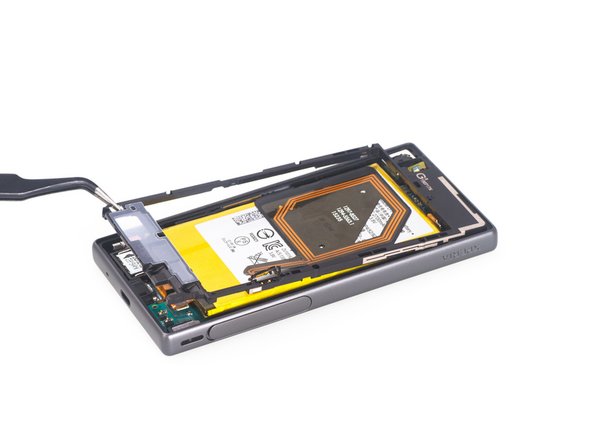
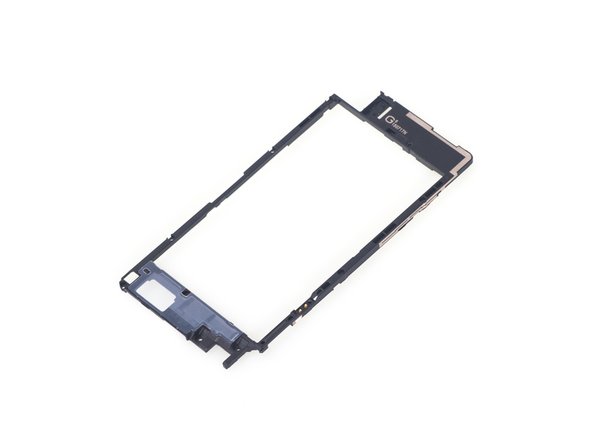
    • Remove the plastic bracket.

    • Pry up and remove back frame.

    Ask FixBot
  5. Sony Xperia Z5 Compact LCD Screen Assembly Replacement: step 5, image 1 of 3 Sony Xperia Z5 Compact LCD Screen Assembly Replacement: step 5, image 2 of 3 Sony Xperia Z5 Compact LCD Screen Assembly Replacement: step 5, image 3 of 3
    • Remove front camera.

    Ask FixBot
  6. Sony Xperia Z5 Compact LCD Screen Assembly Replacement: step 6, image 1 of 3 Sony Xperia Z5 Compact LCD Screen Assembly Replacement: step 6, image 2 of 3 Sony Xperia Z5 Compact LCD Screen Assembly Replacement: step 6, image 3 of 3
    • Remove rear camera.

    Ask FixBot
  7. Sony Xperia Z5 Compact LCD Screen Assembly Replacement: step 7, image 1 of 2 Sony Xperia Z5 Compact LCD Screen Assembly Replacement: step 7, image 2 of 2
    • Remove loudspeaker.

    Ask FixBot
  8. Sony Xperia Z5 Compact LCD Screen Assembly Replacement: step 8, image 1 of 3 Sony Xperia Z5 Compact LCD Screen Assembly Replacement: step 8, image 2 of 3 Sony Xperia Z5 Compact LCD Screen Assembly Replacement: step 8, image 3 of 3
    • Release charging port connector.

    • Remove plastic protective bar.

    • Pry up motherboard assembly from this side. There are three flex connectors connecting the motherboard underneath. So pry up the motherboard assembly gently.

    Ask FixBot
  9. Sony Xperia Z5 Compact LCD Screen Assembly Replacement: step 9, image 1 of 3 Sony Xperia Z5 Compact LCD Screen Assembly Replacement: step 9, image 2 of 3 Sony Xperia Z5 Compact LCD Screen Assembly Replacement: step 9, image 3 of 3
    • Push audio jack out of the slot, no adhesive underneath.

    • Release LCD flex connector and main flex connector by flipping up the white locking tab of the connector base.

    • Separate motherboard assembly from middle housing.

    Ask FixBot
  10. Sony Xperia Z5 Compact LCD Screen Assembly Replacement: step 10, image 1 of 3 Sony Xperia Z5 Compact LCD Screen Assembly Replacement: step 10, image 2 of 3 Sony Xperia Z5 Compact LCD Screen Assembly Replacement: step 10, image 3 of 3
    • The sticker underneath LCD assembly is a little bit strong, so use heat gun to soften it for a few minutes.

    • Remove LCD with digitizer assembly carefully.

    Ask FixBot
  11. Sony Xperia Z5 Compact LCD Screen Assembly Replacement: step 11, image 1 of 1
    • Done.

    Ask FixBot
Conclusion

To reassemble your device, follow these instructions in reverse order.

23 other people completed this guide.

Witrigs

Member since: 11/24/15

70,932 Reputation

377 Guides authored

18 Guide Comments

But what kind of glue do we need to use when we reconnect the screen and the case?

Ronen Yudzinsky - Reply Share

screen replacement is possible without removing the back cover and logic board, similar to the Z1 compact. Simply remove the metal cover once you took the screen off to disconnect the lcd/digi cable.

Toby Liedke - Reply Share

Yeah, I'm confused as to why everything from the back needs to be taken out, when you have to heat up the front sticker anyways and disconnect it. Seems fairly simple to just heat up, cut side adhesive, lift, unplug.

Brian Santero - Reply Share

Have you done the repair that way, Toby Liedke?

jesinisterra - Reply Share

nice guide, for my first reparation, all was fine. Thanks!

bvo - Reply Share

Add Comment

View Statistics:

Past 24 Hours: 2

Past 7 Days: 20

Past 30 Days: 105

All Time: 34,742