Free Shipping on Domestic Orders $75+

Sony Xperia Z3 Compact Battery Replacement

What you need

    1. Sony Xperia Z3 Compact Battery Replacement, Sony Xperia Z3 Compact Battery Replacement: step 1, image 1 of 3 Sony Xperia Z3 Compact Battery Replacement, Sony Xperia Z3 Compact Battery Replacement: step 1, image 2 of 3 Sony Xperia Z3 Compact Battery Replacement, Sony Xperia Z3 Compact Battery Replacement: step 1, image 3 of 3
      • Heat the back cover of your Xperia Z3 Compact with an iOpener to loosen the adhesive underneath.

      • Lift up the back cover with a suction handle and put an opening pick in the gap.

      • Move the pick carefully around the edges to loosen the adhesive on every side of the phone.

      • Now you can pull up the back cover with the suction handle.

      Ask FixBot

      Add Comment

    2. Sony Xperia Z3 Compact Battery Replacement: step 2, image 1 of 2 Sony Xperia Z3 Compact Battery Replacement: step 2, image 2 of 2
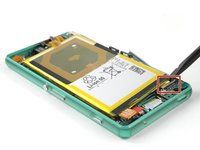
      • Use a tweezer to remove the model label which is hooked in the right side of the frame.

      • Undo the flex cable of the NFC antenna with a tweezer.

      Ask FixBot

      Add Comment

    3. Sony Xperia Z3 Compact Battery Replacement: step 3, image 1 of 2 Sony Xperia Z3 Compact Battery Replacement: step 3, image 2 of 2
      • Unscrew the following screws which hold down the mid frame of the Sony Xperia Z3 Compact.

      • Two 2.7 mm Phillips #000

      • Three 2.5 mm Phillips #000

      • Use a Spudger to lift up the mid frame on each side.

      • Be careful and patient, the plastic mid frame is fragile and might break if bent too hard.

      Ask FixBot

      Add Comment

    4. Sony Xperia Z3 Compact Battery Replacement: step 4, image 1 of 3 Sony Xperia Z3 Compact Battery Replacement: step 4, image 2 of 3 Sony Xperia Z3 Compact Battery Replacement: step 4, image 3 of 3
      • Declamp the metal bracket which holds down the flex connector of the rear camera.

      • Unplug the flex connector of the rear camera and lift it out of its recess.

      Ask FixBot

      Add Comment

    5. Sony Xperia Z3 Compact Battery Replacement: step 5, image 1 of 2 Sony Xperia Z3 Compact Battery Replacement: step 5, image 2 of 2
      • Use a Spudger to unplug the headphone jack and sensor cable connector.

      • Unscrew the single 2.5 mm Phillips #000 screw on the upper left side of the motherboard.

      Ask FixBot

      Add Comment

    6. Sony Xperia Z3 Compact Battery Replacement: step 6, image 1 of 3 Sony Xperia Z3 Compact Battery Replacement: step 6, image 2 of 3 Sony Xperia Z3 Compact Battery Replacement: step 6, image 3 of 3
      • Unplug the battery and display flex connectors.

      • Open the compartments for the SIM card and the micro SD card and remove them.

      Ask FixBot

      Add Comment

    7. Sony Xperia Z3 Compact Battery Replacement: step 7, image 1 of 3 Sony Xperia Z3 Compact Battery Replacement: step 7, image 2 of 3 Sony Xperia Z3 Compact Battery Replacement: step 7, image 3 of 3
      • Use a Spudger to slightly lift up the motherboard.

      • Be careful! You need to thread the display flex cable through a gap in the motherboard while lifting it up. It is also connected to the vibration motor, which still sticks to the phone.

      • Take especially care of the two black connectors on the side of the battery. They break off easily during the removal of the motherboard.

      • Use a tweezer to take out the vibration motor and then remove the motherboard completely.

      Ask FixBot

      Add Comment

    8. Sony Xperia Z3 Compact Battery Replacement: step 8, image 1 of 3 Sony Xperia Z3 Compact Battery Replacement: step 8, image 2 of 3 Sony Xperia Z3 Compact Battery Replacement: step 8, image 3 of 3
      Tool used on this step:
      Plastic Cards
      $2.99
      Buy
      • Gently pull out both of the black straps with the adhesive tabs underneath the battery.

      • Never pull out the straps upwards but always sideways. It can easily happen that you rupture the adhesive tabs. In this case use a plastic card to pry off the battery carefully,Use a little bit of heat if necessary!

      • Now you can remove the battery from the motherboard easily.

      Ask FixBot

      Add Comment

    9. Sony Xperia Z3 Compact Battery Replacement: step 9, image 1 of 3 Sony Xperia Z3 Compact Battery Replacement: step 9, image 2 of 3 Sony Xperia Z3 Compact Battery Replacement: step 9, image 3 of 3
      • Warm up the NFC antenna a little bit to loosen the adhesive underneath.

      • Carefully peel it off the battery. If the adhesive starts to crumble use a plastic card to loosen the adhesive.

      Ask FixBot

      Add Comment

Conclusion

To reassemble your device, follow these instructions in reverse order.

Cancel: I did not complete this guide.

24 other people completed this guide.

Tobias Isakeit

Member since: 03/31/14

134,544 Reputation

189 Guides authored

Team

10 Guide Comments

Thank you Tobias !

My Z3 compact starts now his second life :)

Guy Hard - Reply Share

Thank you for repairing your phone and giving it a second chance.

:)

Tobias Isakeit - Reply Share

Where do I need the Back Cover Adhesive Strips for?

Visser - Reply Share

The guide doesn’t mention that one needs new adhesive for the battery (the one I bought isn’t sold with it). It would therefore be wise to mention what kind of adhesive (two-sided, what thckness, etc.)

axel - Reply Share

Double sided tape is enough to keep it in place, as the back cover and midframe holds everything down for extra reinforcement. Sony sure makes their smartphones !&&* to repair, but that’s another rant.

William Nephew - Reply Share

Add Comment

View Statistics:

Past 24 Hours: 6

Past 7 Days: 21

Past 30 Days: 100

All Time: 44,281