Free Shipping on Domestic Orders $75+

Sony Vaio Fit 13A Heatsink + Fan Assembly Replacement

What you need

  1. Sony Vaio Fit 13A Heatsink + Fan Assembly Replacement, Back Cover: step 1, image 1 of 2 Sony Vaio Fit 13A Heatsink + Fan Assembly Replacement, Back Cover: step 1, image 2 of 2
    • Starting with the laptop top-down, locate and remove the twelve 1mm Phillips #0 screws securing the back cover to the main body of the computer.

    Ask FixBot

    Add Comment

  2. Sony Vaio Fit 13A Heatsink + Fan Assembly Replacement: step 2, image 1 of 2 Sony Vaio Fit 13A Heatsink + Fan Assembly Replacement: step 2, image 2 of 2
    • Use the Plastic Opening Tools or Metal Spudger to carefully loosen back cover from the body of the computer.

    • Be sure to avoid headphone jack when removing back cover by lifting cover away from computer and up.

    Ask FixBot

    Add Comment

  3. Sony Vaio Fit 13A Heatsink + Fan Assembly Replacement: step 3, image 1 of 1
    • Lift off back cover to access inner components of computer.

    Ask FixBot

    Add Comment

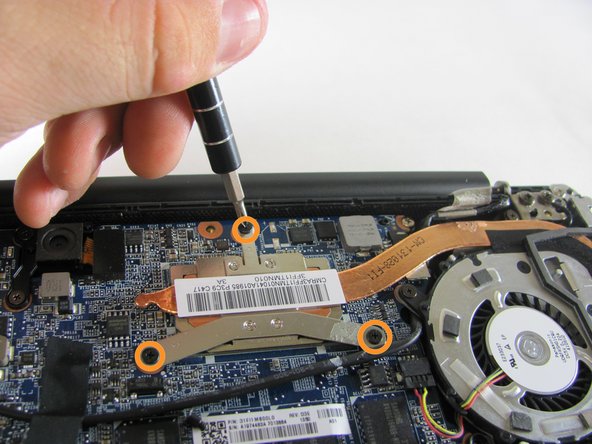
  4. Sony Vaio Fit 13A Heatsink + Fan Assembly Replacement, Fan: step 4, image 1 of 2 Sony Vaio Fit 13A Heatsink + Fan Assembly Replacement, Fan: step 4, image 2 of 2
    • Remove the three 1mm Phillips #0 screws surrounding the fan.

    • Loosen the three 1mm Phillips #0 screws. These screws will stay captive to the heatsink.

    Ask FixBot

    Add Comment

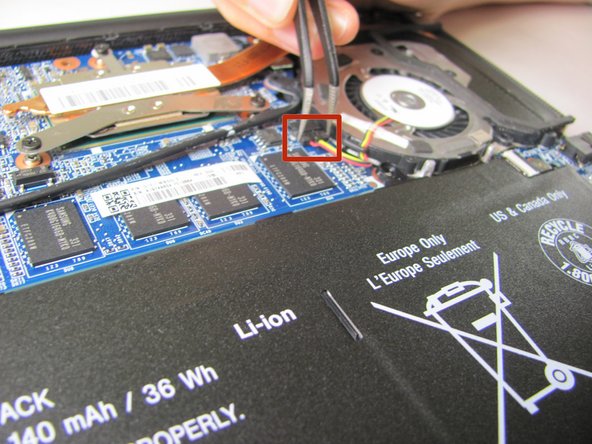
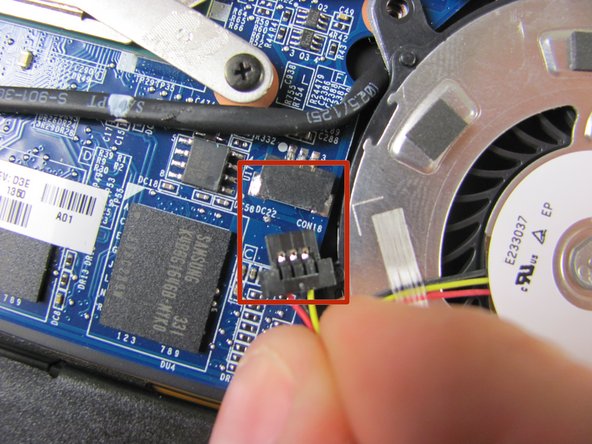
  5. Sony Vaio Fit 13A Heatsink + Fan Assembly Replacement: step 5, image 1 of 3 Sony Vaio Fit 13A Heatsink + Fan Assembly Replacement: step 5, image 2 of 3 Sony Vaio Fit 13A Heatsink + Fan Assembly Replacement: step 5, image 3 of 3
    Tool used on this step:
    Tweezers
    $4.99
    Buy
    • Use tweezers to carefully unplug the fan connector.

    Ask FixBot

    Add Comment

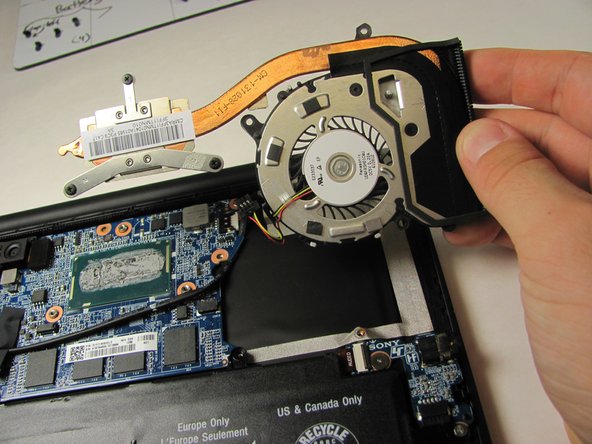
  6. Sony Vaio Fit 13A Heatsink + Fan Assembly Replacement, Remove the Fan: step 6, image 1 of 2 Sony Vaio Fit 13A Heatsink + Fan Assembly Replacement, Remove the Fan: step 6, image 2 of 2
    • Use the Plastic Opening Tool to gently remove the heat sink and fan assembly from the computer.

    • Important: Follow the How to Apply Thermal Paste guide to replace the thermal paste before reassembling your device.

    Ask FixBot

    Add Comment

Conclusion

To reassemble your device, follow these instructions in reverse order.

Cancel: I did not complete this guide.

4 other people completed this guide.

Marii

Member since: 01/08/15

673 Reputation

3 Guides authored

Team

Cal Poly, Team 21-19, Maness Winter 2015 Member of Cal Poly, Team 21-19, Maness Winter 2015

CPSU-MANESS-W15S21G19

4 Members

12 Guides authored

1 Guide Comment

Could you also maybe do a tutorial on Sony Vaio Fit 13? http://www.laptoppartstore.com/replace--... Any luck figuring out how the fan may be detached and re-attached to the heatsink? Also, I notice a very specific type of taping... where can one procure those?

Abhishek D - Reply Share

Add Comment

View Statistics:

Past 24 Hours: 0

Past 7 Days: 11

Past 30 Days: 50

All Time: 5,072