
Sony MVC-FD200 Back Cover Replacement

Kobe Rodriguez and 3 other contributors
Last updated on May 16, 2025
Views: 350
View statistics:
- Past 24 Hours:
- 0
- Past 7 Days:
- 9
- Past 30 Days:
- 56
- All Time:
- 350
Comments: 0
No one has left comments on this guide. Will you be first?
Go to guide commentsCompleted: 0 1
No one has marked this guide "completed." Will you be the first?
1 person has marked this guide "completed." It's you — great job!
Favorites: 1 2
1 person has favorited (and subscribed to) this guide. Will you be next?
2 people have favorited (and subscribed to) this guide — including you!
Needs More Images
A few more images would make this guide's procedures crystal clear.
Missing Steps
Oops! This guide is currently missing one or more important steps.
Introduction
Go to step 1 ↓This guide provides a step-by-step approach to safely removing the back cover of the Sony MVC-FD200. It ensures that users can access the internal parts of the camera for troubleshooting or replacement without harming the device. Whether you are replacing a faulty screen, cleaning the internal parts, or making other adjustments, this guide will help you navigate the process effectively.
What you need
Tools


-
-
-
Using your finger, slide the tab on the battery door up to release the battery latch.
 Ask FixBot
-
-
-
Lift the battery door to reveal the battery compartment.
-
Push the gray lever to the left side to remove the battery.
-
-
-
-
-
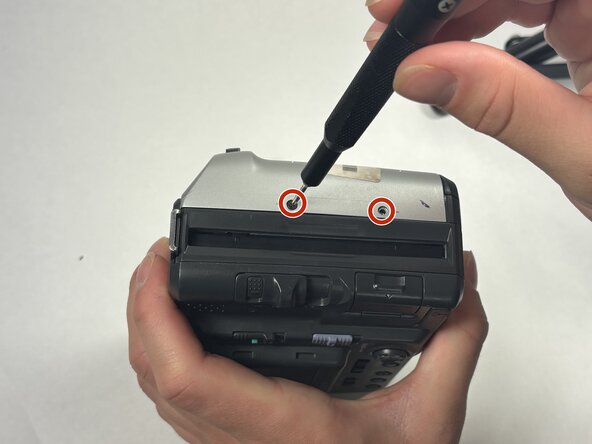
Turn the camera so that the top is facing down towards the table.
-
Using the Phillips #00 screwdriver, remove all 2.0 mm screws with the arrows facing towards them.
-
-
-
-
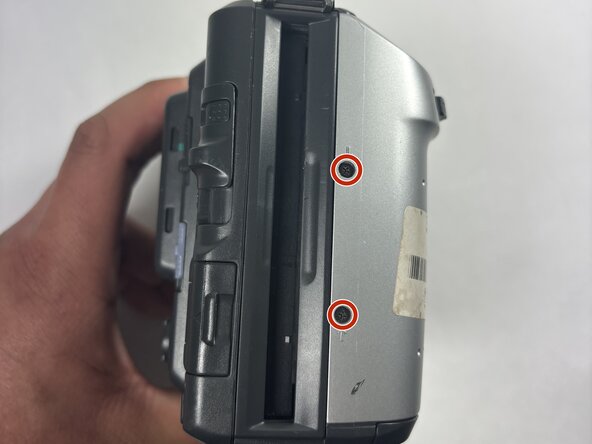
Flip the camera on both sides and remove the rest of the screws with arrows facing towards them.
-
Remove the 2.0 mm screws with the Phillips #00 screwdriver for both sides of the camera.
-
-


To reassemble your device, follow these instructions in reverse order.
Team

UMass Dartmouth, Team 1-4, Rioux Spring 2025 Member of UMass Dartmouth, Team 1-4, Rioux Spring 2025
UMASSD-RIOUX-S25S1G4
4 Members
36 Guides authored
