15% Off Selected iFixit Tools — Limited Time
Free Shipping on Domestic Orders $75+

Sony Ericsson z300 Keypad Replacement

What you need

  1. Sony Ericsson z300 Keypad Replacement, Back Phone Cover: step 1, image 1 of 1
    • To remove the back cover, use your thumb to press down on the center of case and slide it off.

    Ask FixBot

    Add Comment

  2. Sony Ericsson z300 Keypad Replacement, Battery: step 2, image 1 of 1
    • Using a fingernail lift the battery out of the phone.

    Ask FixBot

    Add Comment

  3. Sony Ericsson z300 Keypad Replacement, Sim Card: step 3, image 1 of 1
    • Slide the sim card out with your thumb.

    Ask FixBot

    Add Comment

  4. Sony Ericsson z300 Keypad Replacement, Back Dark Grey Case: step 4, image 1 of 1
    • To remove the back case first remove the four screws shown with a T5 Torx screwdriver

    Ask FixBot

    Add Comment

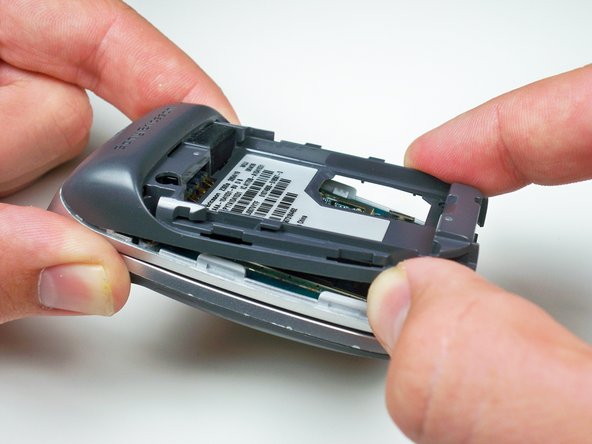
  5. Sony Ericsson z300 Keypad Replacement: step 5, image 1 of 1
    • Using your fingernail lift up the side of the casing around the bottom of the phone to release all five of the clips.

    Ask FixBot

    Add Comment

  6. Sony Ericsson z300 Keypad Replacement: step 6, image 1 of 1
    • Lift up towards the bottom and slide the case off.

    Ask FixBot

    Add Comment

  7. Sony Ericsson z300 Keypad Replacement, Motherboard: step 7, image 1 of 1
    • Use a plastic opening tool to lift up the brass colored panel.

    Ask FixBot

    Add Comment

  8. Sony Ericsson z300 Keypad Replacement: step 8, image 1 of 1
    • Flip up the yellow tab using a plastic opening tool to disconnect the motherboard from the phone body.

    Ask FixBot

    Add Comment

  9. Sony Ericsson z300 Keypad Replacement: step 9, image 1 of 1
    • Work the plastic opening tool around the edges of the motherboard to release it from the clips.

    Ask FixBot

    Add Comment

  10. Sony Ericsson z300 Keypad Replacement, Keypad: step 10, image 1 of 1
    • Using a plastic opening tool lift up the keypad to remove it.

    Ask FixBot

    Add Comment

Conclusion

To reassemble your device, follow these instructions in reverse order.

Cancel: I did not complete this guide.

One other person completed this guide.

Alex Serventi

Member since: 10/07/10

65 Reputation

13 Guides authored

Team

Cal Poly, Team 5-15, Maness Fall 2010 Member of Cal Poly, Team 5-15, Maness Fall 2010

CPSU-MANESS-F10S5G15

4 Members

26 Guides authored

0 Guide Comments

Add Comment

View Statistics:

Past 24 Hours: 1

Past 7 Days: 9

Past 30 Days: 31

All Time: 1,613