Shop the Holiday Gift Guide
Free Shipping on Domestic Orders $75+

Sony CFS-204 Radio Cassette-Corder Speaker Replacement

Views: 2.5K

View statistics:

Past 24 Hours:
3
Past 7 Days:
17
Past 30 Days:
74
All Time:
2,480
Comments: 0

No one has left comments on this guide. Will you be first?

Go to guide comments
Completed: 1

1 person has marked this guide "completed." Will you be next?

Favorites: 0

No one has favorited (and subscribed to) this guide. Will you be the first?

Time Required: 25 - 30 minutes
Difficulty: Moderate
Sony CFS-204 Radio Cassette-Corder Speaker Replacement

Introduction

Go to step 1 ↓

This guide will demonstrate how to open the radio and remove the speakers.

What you need

Tools

    1. Sony CFS-204 Radio Cassette-Corder Speaker Replacement, Batteries: step 1, image 1 of 1
      • Press down on the two tabs at the top of the door.

      • Rotate the door away from the radio, towards you.

      • Lift the door out of the three smaller tabs on the bottom.

      • Ensure the radio is turned off to avoid the possibility of electric shock.

      • The battery compartment door is not shown.

      Ask FixBot

      Add Comment

    2. Sony CFS-204 Radio Cassette-Corder Speaker Replacement, Batteries: step 2, image 1 of 3 Sony CFS-204 Radio Cassette-Corder Speaker Replacement, Batteries: step 2, image 2 of 3 Sony CFS-204 Radio Cassette-Corder Speaker Replacement, Batteries: step 2, image 3 of 3
      • Push the batteries against the spring and pull out using your finger to remove them.

      • To insert the new batteries, push the negative end of the 1st battery against a spring and follow the diagram pictured to insert the batteries in the correct orientation.

      Ask FixBot

      Add Comment

    1. Sony CFS-204 Radio Cassette-Corder Speaker Replacement, Screws: step 3, image 1 of 3 Sony CFS-204 Radio Cassette-Corder Speaker Replacement, Screws: step 3, image 2 of 3 Sony CFS-204 Radio Cassette-Corder Speaker Replacement, Screws: step 3, image 3 of 3
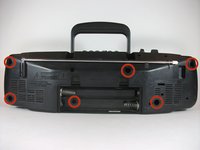
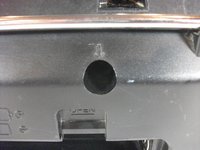
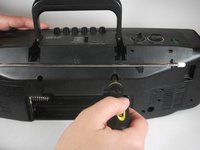
      • Remove the 6 screws (30 mm in length) with the Phillips #2 Screwdriver from the large holes marked by arrows on the radio.

      Ask FixBot

      Add Comment

    2. Sony CFS-204 Radio Cassette-Corder Speaker Replacement, Opening: step 4, image 1 of 1
      • Press the EJECT button to open the cassette deck.

      • Pressing this button is required to allow the front face to separate from the case.

      Ask FixBot

      Add Comment

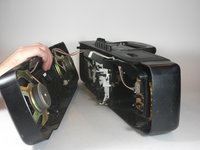
    3. Sony CFS-204 Radio Cassette-Corder Speaker Replacement: step 5, image 1 of 2 Sony CFS-204 Radio Cassette-Corder Speaker Replacement: step 5, image 2 of 2
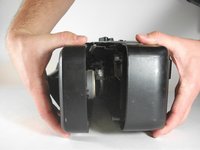
      • Grasp the radio from the front and back halves and gently pull apart to separate them.

      Ask FixBot

      Add Comment

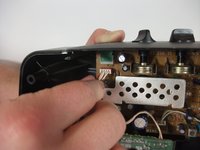
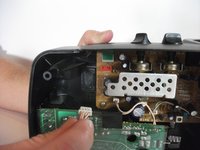
    4. Sony CFS-204 Radio Cassette-Corder Speaker Replacement: step 6, image 1 of 2 Sony CFS-204 Radio Cassette-Corder Speaker Replacement: step 6, image 2 of 2
      • Pull the white plug out from the red outlet in the Orange circuit board in the back face of the casing.

      • Take care not to break the red outlet off the circuit board.

      • The front and back portions of the casing are now separated from each other.

      Ask FixBot

      Add Comment

    1. Sony CFS-204 Radio Cassette-Corder Speaker Replacement, Glue: step 7, image 1 of 1
      • Carefully slice the glue holding the speaker wire at the top right corner of the front face with a sharp tool or a knife to separate the wire from the case.

      • The wire can be tucked into its original location without re-gluing it.

      Ask FixBot

      Add Comment

    2. Sony CFS-204 Radio Cassette-Corder Speaker Replacement, Speaker: step 8, image 1 of 1
      • Remove the 2 screws (10 mm in length) located on the corners of the speaker with the Phillips #2 screwdriver.

      • There are 4 screw positions; however, our radio only had screws in two of the positions on each speaker.

      • Repeat the process for the second speaker if you need to replace both speakers.

      Ask FixBot

      Add Comment

    3. Sony CFS-204 Radio Cassette-Corder Speaker Replacement: step 9, image 1 of 1
      • Lift the speakers out of the front face of the radio to complete the removal.

      Ask FixBot

      Add Comment

Conclusion

To reassemble your device, follow these instructions in reverse order.

Cancel: I did not complete this guide.

One other person completed this guide.

Author

with

Brittany Patterson

Member since: 09/17/14

750 Reputation

4 Guides authored

0 Guide Comments

Add Comment

View Statistics:

Past 24 Hours: 3

Past 7 Days: 17

Past 30 Days: 74

All Time: 2,480